How to Set Up Google Business Profile for Winery Cellar Door (Victoria & Australia)
Your winery isn’t showing on Google Maps
Wine tourists are searching for cellar doors in your region – and they can’t find you.
So they choose somewhere else.
This is one of the most common problems I see working with hospitality venues across Victoria and Australia.
Most wineries don’t get the basics right:
- wrong categories
- hours that never change
- verification set to the wrong address
- photos from years ago
Small things. But they quietly cost you visitors every week.
Setting up your Google Business Profile properly is one of the highest-impact things you can do for your cellar door – and it’s free.
This guide shows exactly how to set up Google Business Profile for a winery, with simple, practical steps for Victoria (Yarra Valley, Mornington Peninsula and regional areas).
If you’d rather have this done properly, you can get a professional setup here.
Quick Setup Checklist for Wineries
Before anything advanced, make sure these basics are right:
✔ Primary category set to “Winery”
✔ Business description written clearly
✔ 15–20 recent, high-quality photos uploaded
✔ Correct cellar door address (not head office)
✔ Accurate hours (including seasonal & public holidays)
✔ Tasting services added (tours, bookings, walk-ins)
✔ Booking or enquiry link connected
✔ Reviews responded to
✔ At least one recent update or event post
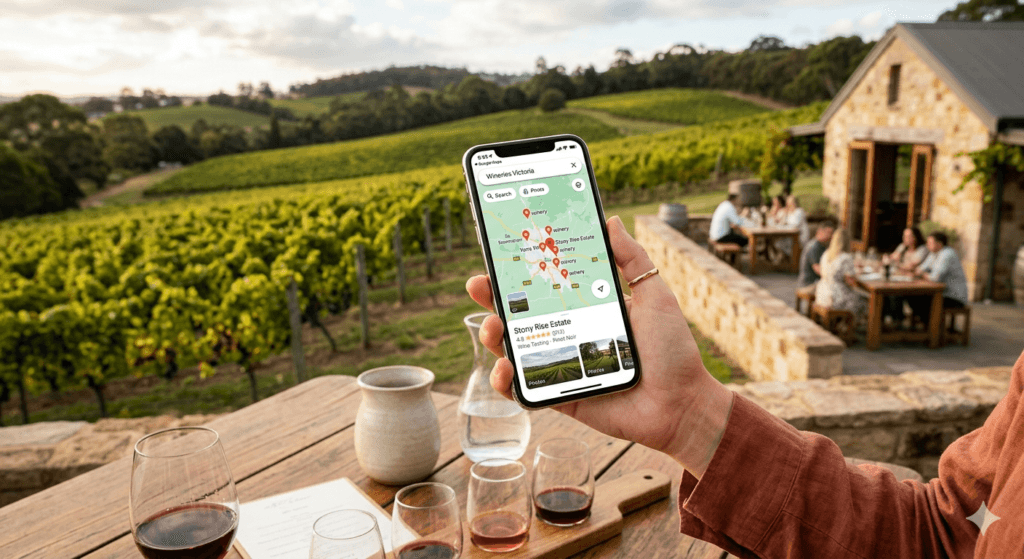
Make your winery be chosen on Google Maps
Why Wineries Need Google Business Profile
Wine tourism in Victoria is growing. Guests are planning day trips and weekend getaways – and almost all of that planning starts on Google Maps.
Here’s what’s actually happening before a guest arrives at your cellar door:
- They search “winery near me” or “cellar door Yarra Valley” on their phone
- Google shows them a map pack of three properties
- They scan photos, check hours and read a handful of reviews
- They decide in under a minute
If your property isn’t in that map pack – or if it appears with outdated photos, wrong hours or a thin listing – you’ve lost that guest before they made a booking or got in the car.
What a properly set up Google Business Profile does for your winery:
| Benefit | What it means in practice |
|---|---|
| Map pack visibility | Your cellar door appears when guests search your region |
| Review presence | Wine tourists read reviews before committing to the drive |
| Event and tasting posts | Harvest events, new releases and long lunches reach new guests |
| Booking links | Guests can reserve directly from your Google listing |
| Seasonal accuracy | Correct hours mean guests arrive when you’re actually open |
Over 70% of wine region searches happen on mobile. Guests are often searching while already in the region – deciding between two cellar doors in real time. Your Google listing is your digital cellar door experience before they ever turn into your driveway.
Step-by-Step: Google Business Profile Setup for Wineries
Step 1 — Create or Claim Your Winery Profile
Before setting anything up, search your winery name on Google Maps.
Google often creates listings automatically using public data from tourism directories, review platforms and wine association websites. Your cellar door may already appear – without you having claimed it or set it up.
⚠️ An unclaimed listing is a real risk. Anyone can suggest edits. Hours, categories and contact details are frequently wrong on auto-generated profiles. You have no ability to respond to reviews or correct what guests see.
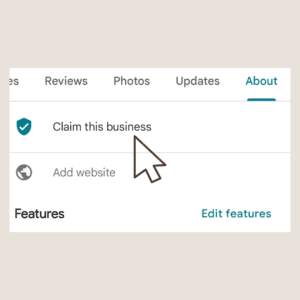
How to get started:
Go to google.com/business and sign in with the Google account you want linked to your winery.
- If your winery appears → select it and follow the steps to claim ownership
- If nothing comes up → choose “add your business” and create from scratch
Verification options:
| Method | Timeframe | Best for |
|---|---|---|
| Postcard to your address | 1–2 weeks | Most rural properties |
| Phone call | Same day | If available in your account |
| Video verification | Same day | Increasingly common option |
| Instant (Search Console) | Immediate | If your website is already verified |
Important for regional Victoria: Many rural winery addresses aren’t verified in Search Console, so postcard or video verification are the most common paths. Don’t leave this until the week before harvest season or a major event.
Step 2 — Choose the Right Categories for Your Winery
Category selection is where most winery profiles go wrong – and it’s one of the highest-impact decisions you’ll make.
Your primary category tells Google what your business is and directly determines which searches you appear in.
I’ve seen Victorian wineries set to “restaurant” or “bar” that were missing wine tourism searches entirely. One category change made a significant difference to how often they appeared in local search results.
Choose your primary category:
| What guests mainly come for | Primary category |
|---|---|
| Wine tastings and cellar door | Winery ← almost always correct |
| Primarily a vineyard property | Vineyard |
| Wine bar experience | Wine bar (only if this genuinely describes you) |
“Winery” is the right primary category for almost every Victorian cellar door. Don’t switch it to “restaurant” even if your food offering is exceptional – you’ll lose the wine tourism searches that drive cellar door visits.
If your profile is currently set to ‘Vineyard’, you may not appear in wine tourism searches. For most cellar doors, ‘Winery’ should be your primary category, with ‘Vineyard’ added as a secondary if relevant.
Then add secondary categories to capture everything your property offers:
- Restaurant – if you have a full dining experience
- Event venue – if you host weddings, harvest lunches or functions
- Bed and breakfast / Hotel – if accommodation is available
- Tourist attraction – relevant for well-known estate properties
- Tour operator – if you run guided tastings or vineyard tours
Step 3 — Verify Your Cellar Door Location Accurately
This step has a detail that’s specific to wineries – and it matters more than most owners realise.
Use your exact cellar door address, not your head office or postal address.
Many Victorian wineries have their registered business address in Melbourne or at a different property. If that’s what Google uses, your map pin will be placed incorrectly – and guests following navigation will arrive at the wrong location.
After verification, check your map pin:
- Open your profile on Google Maps
- Zoom into satellite view
- Confirm the pin is sitting on your actual cellar door entrance
- If it’s off – even slightly – drag it to the correct location
For guests driving through unfamiliar regional roads in the Grampians, Heathcote or the Pyrenees, arriving at the wrong gate is a genuinely poor experience. It creates frustration before they’ve tasted a single wine – and that sometimes turns into a review.
Step 4 — Add Accurate Seasonal Hours and Services
This is where winery profiles differ most from other hospitality venues – and where most fall behind.
Cellar door hours change. Seasonally. For harvest. For winter. For public holidays. For private events. A profile with static hours set once and never updated is actively misleading guests throughout the year.
Hours to keep updated:
- Standard trading hours (by day of week)
- Seasonal hours – summer extended hours, winter reduced hours
- Public holiday hours – everyone, every year
- Harvest period – if cellar door access changes during vintage
- Private event closures – if you close for functions
- “Temporarily closed” when needed – use this rather than leaving wrong hours
A guest who checks Google, sees you’re open, drives an hour and finds the cellar door closed will not come back. And they will leave a review. Keeping hours accurate is one of the simplest, highest-impact things you can do.
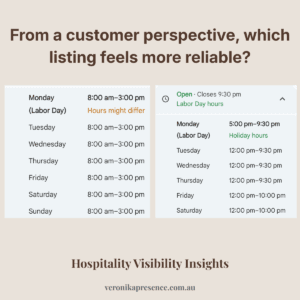
For tasting services: use the Services section of your profile to list what’s available – seated tastings, walk-in tastings, guided tours, private tastings, food and wine pairings. The more specific you are, the better Google can match your listing to relevant searches.
Step 5 — Upload Winery Photos That Actually Convert Visitors
For a winery, photos aren’t decoration – they’re the deciding factor. Guests are making a real-time and travel commitment. They’re using your photos to decide if your property is worth the drive.
Aim for at least 15–20 photos. Here’s how to prioritise them:
| Photo type | Suggested proportion | Why it matters |
|---|---|---|
| Cellar door exterior | ~30% | First recognition point – guests need to identify the arrival |
| Tasting room interior | ~25% | Sets expectations for the experience |
| Wine being poured or tasted | ~20% | The core product, well presented |
| Vineyard rows – seasonal | ~15% | Landscape and scale – heavily shared and saved |
| Events, harvest, long lunches | ~10% | Shows the property is active and worth the trip |
Additional photos worth adding:
- 🐕 Dogs on the property – if dog-friendly, show it
- 🧺 Grazing boards or food offerings – strong visitor decision driver
- 🌅 Views from the property – one of the most saved photo types
- 🍂 Seasonal shots – update these quarterly, not once a year
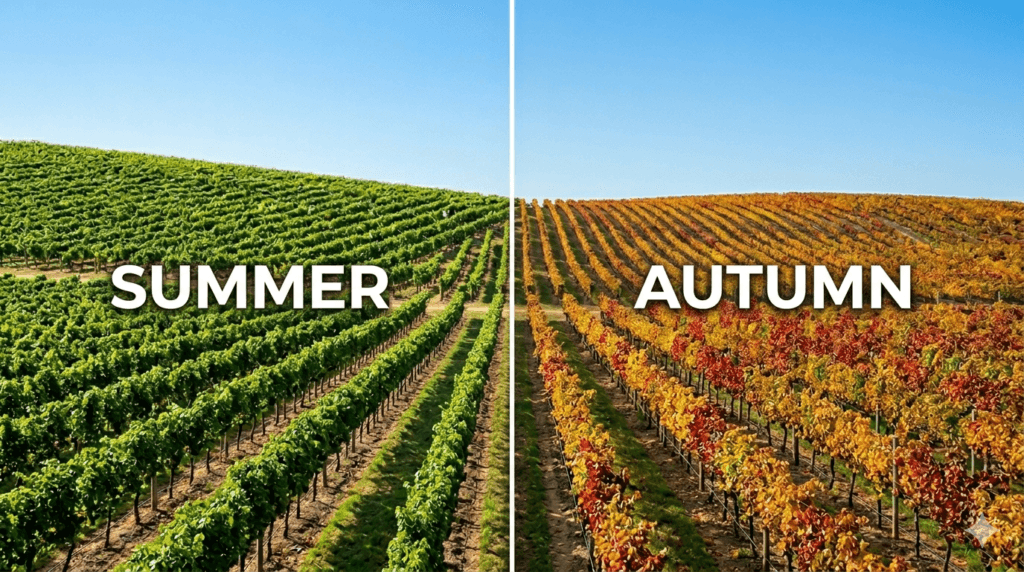
The most common photo mistake I see on Victorian winery profiles: Summer photos running through winter. Lush green vineyard shots in July when the vines are bare. It creates a disconnect – guests arrive expecting one thing and find another.
Update your cover photo and gallery seasonally. Even two or three new photos per season signals an active, maintained property.
Read More: What Photos Work Best on Google Business Profile for Cafés, Restaurants and Wineries
Step 6 — Write a Winery Description That Ranks and Converts
Google gives you 750 characters for your business description. For a winery, this is your chance to capture the experience in a way that makes a guest decide to visit.
What a strong winery description includes:
- Region – Yarra Valley, Mornington Peninsula, Grampians, Heathcote, etc.
- Varietals – what you grow and what you’re known for
- Property style – boutique, family-owned, estate, biodynamic, etc.
- Cellar door experience – what it actually feels like to visit
- Practical details – dog-friendly, bookings required, food available, views
- The “worth the drive” reason – what makes your property distinctive
What to avoid: Generic language that every winery uses. “Award-winning wines in a stunning setting” appears on hundreds of Victorian winery profiles. It tells a guest nothing specific about why they should choose yours.
❌ Weak description: “Award-winning wines in a stunning vineyard setting. Visit our cellar door for tastings and enjoy beautiful views. Open weekends.”
✅ Stronger description: “A small family-owned estate in the Grampians producing cool-climate shiraz and riesling. Relaxed seated tastings Thursday to Sunday — no bookings needed, dogs welcome on the deck. Views across the vines, a grazing board worth stopping for, and a vintage worth taking home.”
The second description tells a guest the region, the wines, the vibe, the logistics and why it’s worth the drive. That’s exactly what converts a search into a visit.
Common Winery Google Business Profile Mistakes — and How to Fix Them
These aren’t obvious errors. But in my experience reviewing winery profiles across Victoria, they come up consistently – and they quietly cost cellar doors visitors every week.
| Mistake | Why it hurts | How to fix it |
|---|---|---|
| Wrong primary category (“restaurant” or “bar”) | Misses wine tourism searches entirely | Change primary to “Winery” immediately |
| Map pin in wrong location | Guests navigate to the wrong place before they arrive | Drag pin to exact cellar door entrance in satellite view |
| Static hours never updated | Guests arrive during harvest, winter or a closure to find you shut | Update seasonally – set a quarterly calendar reminder |
| No photos of the vineyard | Guests can’t visualise the property – wine tourism is visual | Add vineyard shots every season |
| Description reads like a brochure | Generic language, no differentiation, no reason to choose you | Rewrite with specific varietals, region and experience details |
| Events not reflected in profile | Guests miss harvest lunches, wine releases and long lunch dates | Use GBP posts for every event – they appear directly on your listing |
| No wine products listed | Guests can’t see what you produce before visiting – a missed opportunity every competitor is ignoring | Add each wine variety using the GBP Products feature – photo, description and price range |
| No review responses | Looks unmonitored – high-risk for tourism venues | Respond to every review within a week |
| Duplicate listings | Splits your reviews and confuses guests | Search for duplicates and request merging through Google support |
| Accommodation not mentioned | Guests looking for a winery stay don’t find you | Add hotel/B&B as secondary category, mention in description |
One Mistake Worth Expanding On – Not Using the Products Feature
Most Australian wineries have never touched this.
Google Business Profile has a Products feature that lets you list individual items directly on your listing – with a photo, a short description and a price range. For a winery, that means your Pinot Noir, your Chardonnay, your Rosé, your sparkling – each one visible to a guest before they’ve even decided to visit.
Here’s why it matters
When a guest is comparing two cellar doors on Google Maps, one listing shows wines – what they look like, what they cost, what the varieties are. The other listing shows nothing. The first one feels more real, more ready, more worth the drive.
Almost no Australian winery is using this. Which means adding it now gives you a visible advantage over every competitor who hasn’t.
How to add your wines as products
- Go to your Google Business Profile dashboard
- Select Edit profile
- Choose Products
- Click Add product
- Add a photo of the bottle or label, wine name, short description and price range
- Repeat for each variety you want to feature
Keep it simple. Three to five of your signature wines is enough to start. Update it when a new vintage releases or a wine sells out.
If several of these apply to your listing, a one-time profile clean-up addresses all of them in one structured process — so your listing accurately reflects your property from that point forward.
Google Business Profile Optimisation Checklist for Victorian Wineries
Use this before publishing your profile – and come back to it each season.
Profile foundations
- Primary category set to “Winery”
- Secondary categories added (restaurant, event venue, accommodation if applicable)
- Exact cellar door address used – not head office or postal address
- Map pin confirmed on correct location in satellite view
- Business name is exact trading name – no keywords added
Information and hours
- Phone number is the cellar door direct line
- Website links to your visit or cellar door page — not just the homepage
- Trading hours filled in for every day of the week
- Seasonal hours updated
- Public holiday hours set
- Booking link connected if you take reservations
Content and visuals
- Business description written — 700+ characters, specific to your property
- Minimum 15 photos uploaded
- Photos include: exterior, tasting room, wine, vineyard, food, views
- Cover photo is current and seasonal
- Tastings, tours and services listed in the Services section
Ongoing activity
- At least one GBP post published (harvest update, event, new release)
- Reviews responded to – all of them
- Profile reviewed for accuracy – every season
- New photos added – at minimum quarterly
Technical
- 100% profile completion (Google shows a completion indicator)
- FAQ schema applied if you’ve added a FAQ section
- Google Search Console verified (speeds up future verification
Frequently Asked Questions
What Google Business Profile category should a winery use?
“Winery” should be your primary category in almost every case.
This is the category that matches what guests search for when looking for a cellar door experience. Add “restaurant,” “event venue” or “tourist attraction” as secondary categories if those things genuinely apply – but always keep “Winery” as primary.
Switching to “restaurant” because your food offering is strong is one of the most costly category mistakes I see on Victorian and Australian winery profiles. It removes you from wine tourism searches entirely.
How do wineries verify their Google Business Profile?
The most common verification methods for regional Victorian wineries are postcard – sent to your cellar door address, arrives in one to two weeks, or video verification, which is same-day and increasingly available.
Use your exact cellar door address for verification, not a head office or postal address. If the address doesn’t match your physical location, the verification process can become complicated and delay your listing going live.
Can wineries add tasting tours and events to their Google listing?
Yes – and this is one of the most underused features on winery profiles across Australia.
Use the Services section to list your tasting experiences – seated tastings, guided tours, private tastings, food and wine pairings – with descriptions and price ranges.
Use GBP Posts for upcoming events – harvest lunches, new vintage releases, long lunch dates, wine club events. These posts appear directly on your Google listing and in Maps, reaching guests actively searching your region right now.
Why isn’t my cellar door showing on Google Maps?
Several things can cause this. The most common:
Listing not verified – unverified profiles have very limited visibility
Wrong primary category – “restaurant” instead of “winery” misses wine tourism searches
Incomplete profile – Google favours complete, active listings over thin ones
No recent activity – a profile last updated two years ago signals an inactive business
Map pin in a wrong location – if your pin is placed incorrectly, Google may not associate your listing with the right geographic area
Start with verification and category – these two fixes alone often create a significant improvement in visibility.
How do I handle seasonal hours for my winery on Google Business Profile?
In your GBP dashboard go to Edit profile → Hours.
Set your standard weekly hours and use Special hours for specific dates – public holidays, event closures, harvest periods, vintage.
For seasonal trading hour changes – extended summer hours or reduced winter hours – update your standard hours directly when the season changes. Set a recurring calendar reminder at the start of each season so you never have wrong hours running on your listing.
Should my winery have separate Google listings for the cellar door and the restaurant?
Generally no – unless they operate as genuinely separate businesses with different names, entrances and staff.
For most Victorian wineries, one well-structured profile with secondary categories covering dining, events and accommodation is cleaner and significantly less likely to cause duplicate listing issues.
Duplicate listings split your reviews, confuse guests and can be difficult to resolve. Get professional advice before creating a second listing if you’re unsure.
How often should a winery update its Google Business Profile?
At minimum, once per season – four times a year.
The wineries with the strongest Google presence in Victoria update more frequently. A post about harvest. A new vintage release. Updated photos after a long lunch event. Hours change for the Easter long weekend.
Each update signals to Google that your property is active and worth showing to guests searching your region. Weekly tasting posts are ideal – even a short post about what’s pouring this weekend keeps your listing fresh and visible.
Getting Your Winery’s Google Presence Right
Most wineries across Victoria and Australia put enormous care into the wines, the cellar door, the food and the landscape.
The Google listing – the first thing a wine tourist sees before they ever visit – often doesn’t get the same attention.
That gap is where visits are lost. Guests who would have loved your property choose somewhere else because the listing didn’t give them enough confidence to make the trip.
Getting your Google Business Profile set up properly – knowing how to set up Google Business Profile for a winery the right way – means your listing works for your cellar door every day. Before the guest books. Before they get in the car. Before they arrive.
See what’s included in the one-time profile clean-up →
Or start with a free look at how your winery currently appears on Google Maps:
Request a free visibility check →
Not sure which service is right for you? Visit the full services page →
Weronika Atkins is a Google Business Profile specialist working with hospitality venues across Melbourne and regional Victoria. Her focus is on how guests discover and choose venues on Google Maps — and what winery, café and restaurant owners can do to make that decision easier.
Working with venues across Australia to help cellar doors, restaurants and cafés appear with confidence on Google Search and Maps.