
How to Set Up a Google Business Profile for a Café in Melbourne
Most people decide where to get coffee before they leave the house.
They open Google Maps, scan two or three options nearby and choose the one that looks open, appealing and worth the trip. If your café doesn’t appear – or appears with outdated photos, missing hours or an incomplete listing – they move on. And you never know they looked.
In my experience working with hospitality venues across Melbourne, most café profiles have at least three or four gaps that quietly affect whether guests find them and choose them. Small things. Easy to miss when you’re busy running a café. But they add up.
This guide walks through everything – from claiming your listing to the details that actually influence whether a guest walks through your door.
Quick Setup Checklist for Melbourne Cafés
✔ Choose the right primary category
✔ Write a clear, specific business description
✔ Upload at least 10 recent, high-quality photos
✔ Add accurate hours (including public holidays)
✔ Add a clear menu or services
✔ Set attributes (outdoor seating, takeaway, etc.)
✔ Respond to reviews
✔ Add 1–2 Google updates before the weekend
If you’re unsure how your profile is currently performing, you can request a visibility check here.
Before You Set Anything Up — Does Your Café Already Exist on Google?
Google often creates listings automatically using public data. Your café may already appear on Google Maps without you knowing.
How to check: Search your café name on Google or open Google Maps and look for your venue.
⚠️ If your listing exists but isn’t claimed, sort this out first. An unclaimed listing can be edited by anyone. Hours are often wrong. Photos may have been added by guests. The category might be off. You have no control over what guests see.
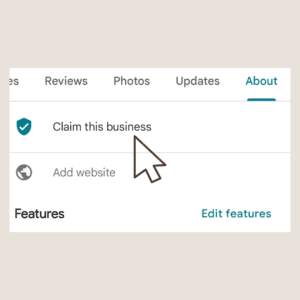
Claiming and creating both start at the same place: google.com/business
- If your café appears → select it and follow the steps to claim ownership
- If nothing comes up → choose “add your business” and create from scratch
Step-by-Step: How to Set Up Your Google Business Profile
Step 1 — Create or Claim Your Listing
Go to google.com/business and sign in with the Google account you want linked to your café.
Search your business name first. Claim it if it exists. Create it if it doesn’t.
Verification: Google requires you to verify ownership before your listing goes fully live. Common methods:
| Method | Timeframe |
|---|---|
| Postcard to your address | 1–2 weeks |
| Phone call | Same day |
| Video verification | Same day |
| Instant (if your site is in Search Console) | Immediate ( but for new service-area businesses, Google may still default to video even with GSC) |
Your listing may appear on Maps before verification completes – but you can’t fully manage it until it’s confirmed.
Step 2 — Choose the Right Business Category
This is one of the most important decisions in your entire setup – and one of the most commonly done wrong.
Choosing a broader or ‘safer’ category often reduces your visibility instead of increasing it.
I’ve seen cafés set to “restaurant” missing coffee searches entirely. Category affects which searches you appear in. Get this wrong and the right guests won’t find you.
Choose your primary category:
| If your café is mainly known for… | Best primary category |
|---|---|
| Sit-down café with food focus | Café |
| Coffee-first venue (espresso, takeaway, specialty) | Coffee shop |
| Strong food offering (eggs, toast, meals) | Breakfast restaurant |
| Brunch-focused destination | Brunch restaurant |
Your primary category is one of the strongest signals Google uses to decide when to show your business.
Then add secondary categories for everything else you offer.
Common secondary categories for cafés:
- Bakery (if you make or sell baked goods)
- Sandwich shop (if takeaway food is a focus)
- Takeaway restaurant
- Juice bar
Step 3 — Fill In Your Business Information
Every detail here needs to match your website, socials and any other directories you’re listed in. Inconsistencies – even small ones – quietly undermine your listing.
| Field | What to do |
|---|---|
| Business name | Exact trading name only. No keywords added (e.g. “Best Coffee Fitzroy”). Google will flag this. |
| Address | Match your shopfront exactly |
| Phone | Your main contact or bookings number |
| Website | Link to the most useful page – homepage, menu or bookings |
| Hours | Fill in carefully. Wrong hours cost you guests and reviews. |
This is based on reviewing café profiles across Melbourne and regional Victoria.
Step 4 – Write a Description That Actually Reflects Your Café
Google gives you 750 characters. Use them.
What to include:
- What you’re known for – the coffee, the food, the atmosphere
- Where you are and what the neighbourhood is like
- What makes your café different from nearby options
- Practical details – reservations, dog friendly, seating setup
What to avoid: Generic phrases that every café uses and that tell a guest nothing specific.
❌ Weak description: “We serve great coffee and delicious food in a warm and welcoming atmosphere. Come visit us in Fitzroy.”
✅ Stronger description: “A neighbourhood café in Fitzroy specialising in single-origin filter coffee and all-day brunch. Dog-friendly, counter seating only, and usually full by 10am on weekends – which we take as a good sign.”
The second one tells you exactly what to expect. Guests who read it know whether it’s right for them before they arrive. That’s what you want.
Step 5 — Add Photos That Show What Your Café Is Really Like
Photos are often the deciding factor before a guest chooses where to go. A profile with no photos – or with blurry images from five years ago – signals an unmonitored business.
Before reading reviews or menus, most guests quickly scan photos to decide if a place feels right.
Aim for at least 10 photos to start. Prioritise:
| Photo type | Why it matters |
|---|---|
| Exterior (daylight) | Guests need to recognise you from the street |
| Interior (natural light) | Sets the atmosphere before they arrive |
| Coffee – signature drink | Shows quality and presentation |
| Food – current menu items | Not dishes from years ago |
| Counter or service area | Guests like to see the setup |
| People /atmosphere | People /atmosphere – helps guests imagine themselves there |
One of the most common issues I see is profiles filled with outdated or inconsistent photos, which quietly reduces trust.
Keep your photos current – small updates over time signal that your venue is active, cared for, and worth choosing.
If you’re unsure what your photos should show, I’ve explained what works in detail in this guide to Google Maps photos for cafés, restaurants and wineries.

People /atmosphere – helps guests imagine themselves there – busy Melbourne café environment
Step 6 — Set Up Your Attributes
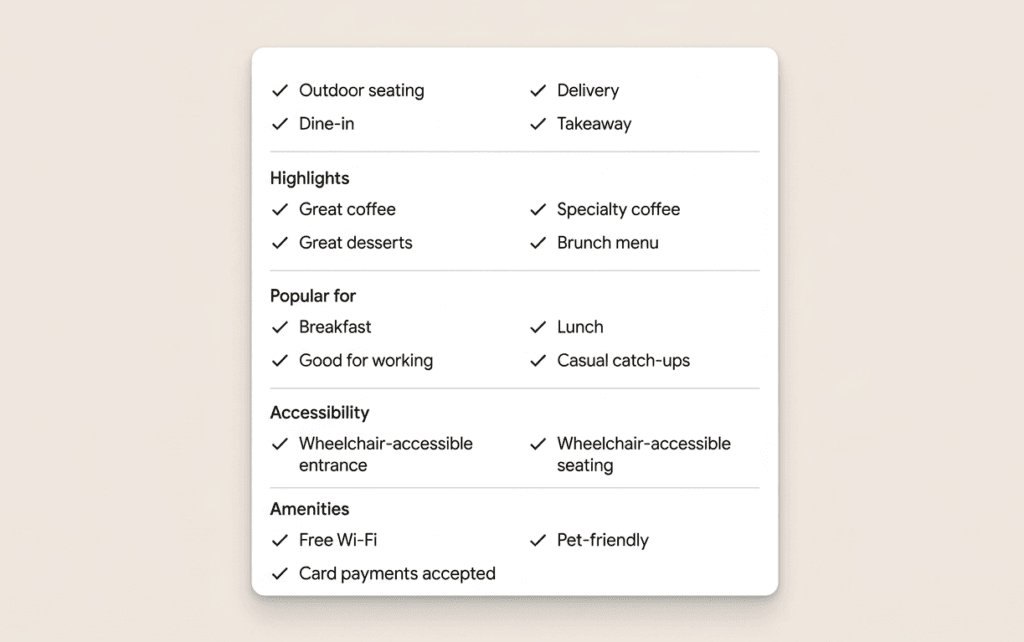
Attributes are the detail tags on your profile — dine-in, takeaway, outdoor seating, free wifi, wheelchair accessible.
When a guest filters Google Maps by “outdoor seating” or “dog friendly,” your café only appears if that attribute is turned on. If it’s missing, you’re invisible to that search.
For Melbourne cafés, confirm these:
- Dine-in and takeaway
- Outdoor seating – Melbourne guests actively filter for this
- Dog friendly – increasingly searched in inner suburbs
- Accessibility attributes
- Payment options – card only, cash free, etc.
Step 7 — Add Your Menu or Services
Guests want to know what you serve before they decide to visit — or before they have to call and ask.
- If you have an online menu → link to it directly from your profile
- If you don’t → use Google’s built-in menu feature to list your key items
You can add your menu in a few different ways:
- Link to your website menu
- Upload a photo or PDF of your menu
- Use Google’s menu editor to list items, descriptions, and prices
Many guests won’t click through to your website – they’ll look at your menu directly on your Google profile.
Clear, simple menus perform better than long or cluttered ones – guests are usually scanning quickly, not reading in detail.
Google can now also generate a menu from a photo or PDF – but it’s worth checking it carefully to make sure everything is accurate.
Even a simple, up-to-date menu is better than none – it reduces friction and helps guests decide faster.
Step 8 — How Google Answers Questions About Your Venue
Guests often have quick questions before deciding to visit – about parking, dietary options, bookings, or seating.
Previously, Google allowed businesses to manually add and answer these through a Q&A section. This feature has now been phased out and replaced with an AI-powered tool called Ask Maps.
Instead of relying on manually added questions, Google now generates answers using information from your profile, website, and reviews.
This means your profile needs to be clear, complete, and up to date – because that’s what guests will see when they ask questions.
In practice, this includes:
- Accurate business details (hours, services, offerings)
- Clear descriptions
- Up-to-date menus and photos
- Consistent information across your website
The more complete your profile, the more confidently Google can present your venue to potential guests.
This is one of the reasons ongoing profile care matters – small details now directly influence how your venue is presented when guests ask questions.
What Most Melbourne Café Profiles Get Wrong
Setting up the basics is one thing. But most profiles – even ones that have technically been “done” – have gaps that quietly cost guests.
These aren’t obvious mistakes – but they affect whether your venue gets chosen.
Here’s what I see most often when reviewing hospitality profiles across Melbourne:
| Common mistake | Why it costs you guests |
|---|---|
| Wrong category (e.g. “restaurant” instead of “café”) | Misses coffee-specific searches entirely |
| Hours wrong on public holidays | Guests arrive expecting you to be open – and leave disappointed, leaving bad review |
| Outdated photos | Profile no longer reflects the real experience |
| Blank or auto-generated description | Tells guests nothing specific – they move on |
| No review responses | Profile looks unmonitored and disengaged |
| Broken website link | Guest clicks through, hits an error, leaves |
| Attributes not filled in | Invisible in filtered searches for outdoor seating, dog-friendly, etc. |
Most of these are simple to fix – but when left unchecked, they quietly reduce trust and cost you visits.
This is exactly what I look for when reviewing a Google Business Profile – not just what’s there, but how it’s being perceived by guests.
If your profile has been set up quickly or hasn’t been properly reviewed, a one-time profile clean-up corrects these gaps — so your listing accurately reflects your café and works in your favour every day after.
How to Get Found in the Melbourne Local Map Pack
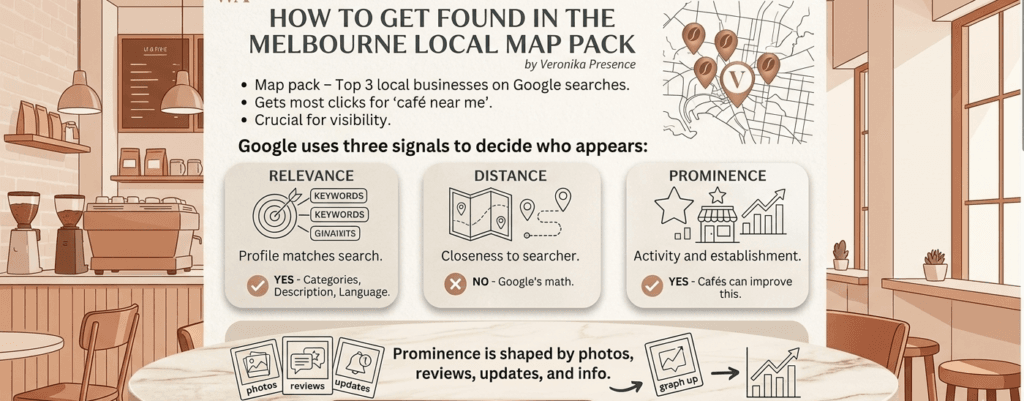
The map pack is the block of three businesses that appears on Google when someone searches “café near me” or “best coffee in Fitzroy.” It sits above regular results and gets most of the clicks.
Google uses three signals to decide who appears:
| Signal | What it means | Can you control it? |
|---|---|---|
| Relevance | How closely your profile matches the search | ✔ Yes – categories, description, language |
| Distance | How close you are to the searcher | ✗ No |
| Prominence | How active and established your profile looks | ✔ Yes – this is where most cafés have room to improve |
Prominence is shaped by recent photos, answered reviews, regular updates and complete information. A profile that looks maintained tells Google your café is an active, well-run business – and that influences which three cafés appear.
For more on what kinds of updates actually move the needle: which GBP updates work best for hospitality venues →
Keeping Your Profile Up to Date
Setting up properly is the foundation. Staying active is what keeps it working.
Do these consistently:
- 📅 Update hours – public holidays, seasonal changes, temporary closures
- 📷 Add new photos – when menus change, seasons shift or the space is refreshed
- 💬 Respond to reviews – positive ones and the harder ones
- 📣 Post occasional updates – new menu, events, changes to your offering
A dormant profile loses ground. Google interprets inactivity as a sign the business may not be operating normally. Guests draw the same conclusion.
Once your profile is set up, the real impact comes from keeping it current – with updated photos, accurate details, and regular activity. This is where many cafés fall behind.
Frequently Asked Questions
Does my café need a Google Business Profile if we already have a website and Instagram?
Yes – and they serve completely different purposes.
Your website and Instagram are where people go once they already know about you. Google Business Profile is how they find you in the first place. When someone searches “café near me” or “coffee in Fitzroy,” Google Maps is usually the first thing they see – not your website. If your profile isn’t set up properly, you won’t appear in those results at all, no matter how good your website looks.
Is Google Business Profile free?
Yes, completely free to set up and manage. Google does not charge businesses to appear in Google Search or Maps through a Business Profile. The only costs involved are your time to set it up and keep it maintained, or having someone manage it for you.
How long does it take to set up a Google Business Profile for a café?
The basic setup takes around one to two hours if you have your information ready – business name, address, phone number, opening hours, photos and website link.
Verification adds time depending on the method. A postcard can take one to two weeks. Phone or video verification is same-day. Your listing may appear on Maps before verification is complete, but you can’t fully manage it until it’s confirmed.
Getting it set up properly – with the right categories, a strong description, optimised attributes and a solid photo gallery – takes more time and careful thought than most café owners expect.
What category should a café use on Google Business Profile?
This depends on what your café is primarily known for.
“Café” is the most common primary category for coffee-focused venues. “Coffee shop” works similarly. If your café is primarily a food destination, “breakfast restaurant” or “brunch restaurant” may be more accurate.
Choosing the wrong category – for example, “restaurant” when you’re mainly a coffee spot – means you miss people searching specifically for cafés. This is one of the most common mistakes I see when reviewing Melbourne café profiles, and it’s worth taking time to get right.
Can I manage my Google Business Profile myself or do I need someone to help?
You can manage it yourself – and many café owners do. The platform is accessible and Google’s own help documentation is reasonably clear.
The challenge is consistency. Keeping your hours updated, responding to reviews, refreshing photos and staying on top of changes takes regular attention. Most café owners start with good intentions and then get busy – and the profile gradually becomes outdated.
If you want your listing set up properly from the start, a one-time clean-up gets everything correct in one go. If staying on top of it ongoing feels like one more task you don’t have time for, that’s what monthly management covers.
Getting Your Café’s Google Presence Right
Most Melbourne café owners have thought about their Google listing at some point. Most haven’t had time to do it properly – because there’s always something more urgent happening inside the café.
An incomplete profile quietly costs you guests who looked, didn’t feel confident and chose somewhere else.
Getting the setup right once – properly – means your listing works for you every day without needing constant attention.
See what’s included in the one-time profile clean-up →
Or if you’d like an outside perspective on how your café currently appears on Google Maps first:
Request a free visibility check →
Weronika Atkins is a Google Business Profile specialist working with hospitality venues across Melbourne and regional Victoria. Her focus is on how guests discover and choose venues on Google Maps — and what café, restaurant and winery owners can do to make that decision easier. Read more about my approach.