How to Optimise Your Restaurant’s Google Business Profile (Australia Guide)
Not Getting Bookings from Google?
In this guide:
- Why restaurant owners can’t ignore Google Business Profile
- Step-by-step optimisation for restaurants
- 7 restaurant GBP mistakes killing your bookings
- Restaurant GBP optimisation checklist
- Frequently asked questions
Your restaurant is on Google Maps. But is it actually working for you?
Most restaurant owners set up their Google Business Profile once – when they opened, or when someone told them they should – and never looked at it again. The category is slightly off. The photos are from the old menu. The hours haven’t been updated since the last public holiday. The last review response was eight months ago.
Guests are searching right now. They’re comparing your restaurant to the one down the road. They’re looking at photos, scanning reviews and checking whether you’re open tonight. If your profile looks unattended – they choose somewhere else.
I work with restaurants across Melbourne and Victoria, helping them fix exactly this. Most profiles I review have at least four or five things working against them that the owner has no idea about.
This guide covers how to optimise Google Business Profile for a restaurant – properly, specifically, with the detail that generic guides skip over.
If you’d rather have this done by a specialist in one go: see what’s included in a one-time profile clean-up →
Quick Optimisation Checklist for Restaurants
✔ Primary category accurately set (e.g. Italian restaurant, not just “restaurant” if applicable)
✔ Business description clearly explains your cuisine and experience
✔ 15–20 recent, high-quality photos (food, interior, exterior)
✔ Menu added properly (not just a PDF — use Google menu where possible)
✔ Accurate opening hours (including public holidays)
✔ Booking link connected directly
✔ Key attributes selected (dine-in, takeaway, outdoor seating, etc.)
✔ All reviews responded to
✔ At least one recent Google update or event post
Why Restaurant Owners Can’t Ignore Google Business Profile
When someone decides where to eat tonight, Google Maps is usually the first place they look.
Not Instagram. Not a food blog. Google Maps – because it shows them what’s open right now, how far away it is, what other people thought and whether they need to book.
Here’s what happens in the 60 seconds before a guest chooses your restaurant or moves on:
- They search “restaurants near me” or “Italian restaurant Melbourne CBD”
- Google shows them three restaurants in the map pack
- They tap the one that looks most appealing
- They scan photos, check the star rating and read two or three reviews
- They decide
If your profile isn’t in that map pack – or if it appears with the wrong hours, outdated photos or no review responses – you’ve lost that booking before you even knew it was possible.
What a fully optimised restaurant profile does
| Benefit | What it means in practice |
|---|---|
| Map pack visibility | Appear when hungry guests search your cuisine or area |
| First impression | Photos and rating determine the tap — before they read anything |
| Review confidence | Guests trust restaurants where the owner responds to feedback |
| Booking friction removed | Direct booking link means they reserve from your Google listing |
| Accurate information | Correct hours and menu prevent lost guests and bad reviews |
| Cuisine searches | Right categories mean you appear for “Thai restaurant” not just your name |
A complete, active Google Business Profile doesn’t just help guests find you. It helps them feel confident choosing you over every other restaurant appearing alongside yours.
Step-by-Step: How to Optimise Google Business Profile for a Restaurant
Step 1 — Claim and Verify Your Listing
Before optimising anything, confirm you actually control your listing.
Search your restaurant name on Google. If your profile shows a “Claim this business” button – someone hasn’t claimed it yet, and that person needs to be you. An unclaimed restaurant profile is editable by anyone and frequently has wrong information.
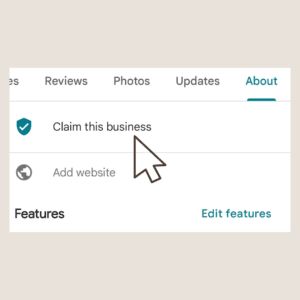
Go to google.com/business and sign in with the Google account you want linked to your restaurant.
- Profile exists and is claimed → go straight to optimisation
- Profile exists but unclaimed → claim it before doing anything else
- No profile exists → create one from scratch
Verification methods:
| Method | Timeframe | Notes |
|---|---|---|
| Video verification | Same day | Most common current method |
| Phone call | Same day | If available in your account |
| Postcard | 1–2 weeks | Still available for some accounts |
| Instant (Search Console) | Immediate | If your website is already verified |
⚠️ Don’t skip verification. An unverified profile has severely limited visibility in Google Maps. Many restaurant owners wonder why they don’t appear in searches — verification is often the answer.
Step 2 — Get Your Categories Right
This is the highest-impact change most restaurants can make — and the most commonly done wrong.
Your primary category tells Google what kind of restaurant you are. It directly determines which searches you appear in. A restaurant set to the wrong primary category misses the searches that matter most.
The most important rule: be specific, not broad.
If the restaurant is clearly defined:
Use:
- Italian restaurant
- Japanese restaurant
- Vegan restaurant
- Steakhouse
as PRIMARY
Then add:
- Restaurant
- Bar
- Takeaway
- Cafe
as SECONDARY
When to keep “Restaurant” as primary
Use Restaurant if:
✔ Mixed cuisine
✔ Not clearly positioned
✔ Menu is broad
✔ No strong identity
“Restaurant” as your primary category is too vague. It puts you in competition with every restaurant in your area for every search. A specific cuisine category — “Italian restaurant,” “Japanese restaurant,” “Vietnamese restaurant” — matches the way guests actually search.
How to choose your primary category
| Your restaurant type | Primary category |
|---|---|
| Italian, pasta, pizza focused | Italian restaurant |
| Japanese, sushi, ramen | Japanese restaurant |
| Vietnamese, pho, banh mi | Vietnamese restaurant |
| Modern Australian, share plates | Australian restaurant |
| Fine dining, degustation | Fine dining restaurant |
| Pub with food | Pub |
| Casual burgers, American | American restaurant |
| Seafood focused | Seafood restaurant |
Then add secondary categories
– to capture every relevant search:
- Restaurant (broad — add as secondary if you haven’t used it as primary)
- Bar (if you have a strong bar offering)
- Takeaway restaurant (if you offer takeaway)
- Catering (if you cater events)
- Event venue (if you host private functions)
- Brunch restaurant (if weekend brunch is a focus)
In my experience reviewing restaurant profiles across Melbourne, the single most common category mistake is using “Restaurant” as the primary when a cuisine-specific category would perform significantly better. A Thai restaurant set to “Thai restaurant” appears for “Thai food near me.” One set to “Restaurant” often doesn’t.
Step 3 — Make Your Business Information Bulletproof
Every piece of information on your profile needs to be accurate, consistent and match what appears on your website and other directories.
Google cross-references your details across the web. Inconsistencies — even small ones like a slightly different phone number or a shortened address — quietly undermine your listing’s credibility with Google.
| Field | What to do |
|---|---|
| Business name | Exact trading name only. No keywords added — “Best Italian Fitzroy” in your name field will get you flagged |
| Address | Match your shopfront exactly — including floor number, suite number if applicable |
| Phone | Your main reservations line — the number a guest would call to book |
| Website | Link to your reservations or bookings page directly — not just your homepage |
| Hours | Lunch service, dinner service, days closed — every variation, updated every time it changes |
Restaurant-specific hours issue
Many restaurants operate split services – lunch Tuesday to Friday, dinner Tuesday to Sunday, closed Monday. Google allows you to set specific hours for each service. Use this. A guest checking if you’re open for lunch on a Wednesday needs to see accurate information, not generic “open 12pm–10pm” that covers everything vaguely.
Step 4 — Write a Description That Makes Guests Choose You
Your business description is 750 characters. For a restaurant competing with dozens of nearby options, those 750 characters need to do real work.
What a strong restaurant description includes
- Your cuisine type and signature dishes or style
- The atmosphere and dining experience – casual, fine dining, share plates, intimate
- Location context – “in the heart of Fitzroy,” “five minutes from the CBD,” “on the Mornington Peninsula”
- Practical details – bookings recommended, walk-ins welcome, BYO, private dining available
- What makes your restaurant the right choice over the one nearby
What to avoid: Every generic restaurant phrase – “fresh ingredients,” “passionate team,” “welcoming atmosphere.” These phrases appear on thousands of restaurant profiles and tell a guest nothing specific about yours.
❌ Weak description: “Award-winning restaurant serving fresh, seasonal cuisine in a warm and welcoming atmosphere. Great food, great service. Book your table today.”
✅ Stronger description: “A neighbourhood Italian restaurant in Carlton serving handmade pasta and wood-fired pizza. Loud, warm, no-reservations for groups under four. Known for the cacio e pepe and the tiramisu that goes fast on weekends. Wine list focused on small Italian producers. Walk-ins welcome — but come early on Friday nights.”
The second description tells a guest exactly what kind of place this is, what to order, how it works and what to expect. They know if it’s right for them before they arrive. That’s what you want.
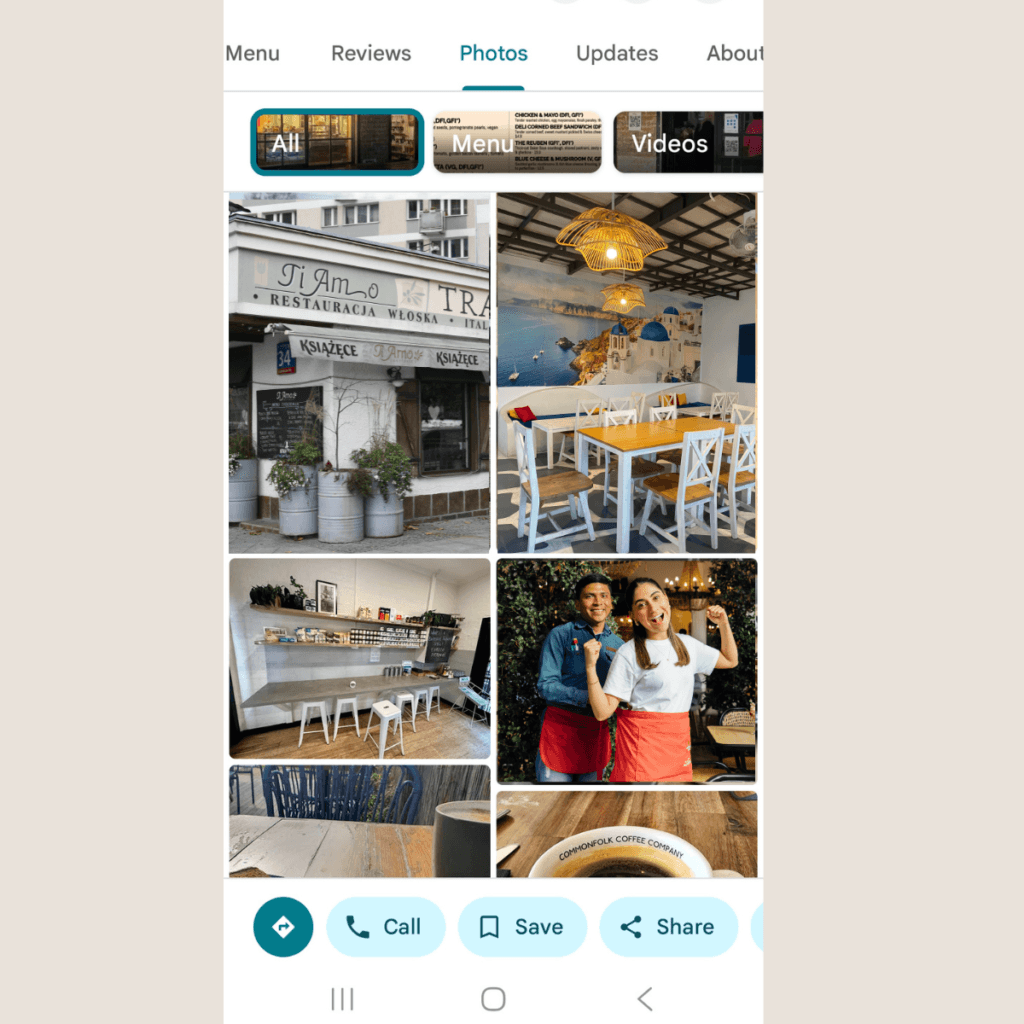
Step 5 — Add Photos That Fill Seats
Photos are the first thing a guest looks at when they tap your listing. Before reviews. Before the description. Before hours.
A restaurant profile with dark, blurry or outdated food photos loses guests to a competitor with ten current, well-lit images – even if the food is considerably better in reality.
Aim for at least 15 photos. Prioritise:
| Photo type | Proportion | Why it matters |
|---|---|---|
| Food — hero dishes | 35% | The primary decision driver — guests eat with their eyes first |
| Interior — atmosphere | 25% | Sets expectations for the dining experience |
| Exterior — shopfront | 20% | Guests need to recognise you when they arrive |
| Bar or drinks | 10% | Relevant for guests choosing based on wine list or cocktails |
| Team or kitchen | 10% | Adds warmth and personality — guests connect with people |
Photo tips specific to restaurants:
- Shoot hero dishes in natural light – phone cameras in 2026 are good enough if the light is right
- Interior shots work best at service time — show the restaurant as guests experience it, not empty
- Update food photos when the menu changes – outdated dishes create confusion and disappointment
- Never use stock photos – guests notice and it immediately undermines trust
Read More: What Photos Work Best on Google Business Profile for Cafés, Restaurants and Wineries
Step 6 — Set Up Your Menu Properly (This Affects Bookings)
For a restaurant, the menu is one of the most looked-at sections of your Google profile.
Guests want to know what you serve – and what it costs – before they decide to book. If that information isn’t there, some of them won’t bother finding out. They’ll just tap the next restaurant.
Three ways to add your menu:
| Option | Best for |
|---|---|
| Google’s built-in menu editor | Best visibility – Google reads and indexes each dish |
| Link to your website menu | Best if your menu changes frequently |
| Upload a PDF or photo | Quick option but least effective for search visibility |
Which to choose:
If your menu is stable – use the built-in editor. It gives Google the most structured information and helps your listing appear in food-specific searches like “Italian restaurant with handmade pasta Melbourne.”
If your menu changes constantly – link to your live website menu page so it stays current automatically.
Avoid relying on a PDF only. It’s hard to read on mobile, Google can’t extract information from it easily, and it does nothing for your search visibility.
How to make your menu work harder:
- Add dish names, descriptions and prices – not just a list of items. A short description of your signature dishes helps guests decide and helps Google understand what you serve
- Use clear sections – starters, mains, desserts, drinks. Guests scan menus, they don’t read them top to bottom
- Be specific with dish names – “Grilled Barramundi with Lemon Butter” outperforms “House Special” every time. Guests search for dishes. Specific names get found
- Add photos to your top dishes – you don’t need a photo of everything. Focus on your three to five signature or most visually appealing dishes
- Mention dietary options naturally – “vegan mushroom risotto,” “gluten free pasta available” — these phrases match how guests filter and search
Keep it current.
A guest who sees a dish listed on your Google profile and can’t find it when they arrive is a guest who leaves a review about it. Update your menu every time something changes — a new seasonal dish, a price adjustment, anything discontinued.
Menu checklist before you move on:
- Menu added using Google’s built-in editor where possible
- Each dish has a name, price and short description
- Menu is divided into clear sections
- Photos added to signature dishes
- Menu matches what is actually being served right now
Connect Your Booking System (This Drives Real Bookings)
This is one of the highest-conversion improvements you can make to a restaurant profile — and one of the most commonly skipped.
Every extra step between “I want to book” and “booking confirmed” loses a percentage of guests. Remove as many steps as possible.
Google allows guests to book directly from your profile.
That means:
👉 no website
👉 no searching
👉 no extra steps
Just:
see → click → book
Every extra step between
“I want to book” and “booking confirmed”
loses a percentage of guests.
our goal is simple: Make booking as easy as possible
What to connect
If you use a booking platform, connect it directly:
- ResDiary
- SevenRooms
- OpenTable
- Quandoo
- Now Book It
These integrate with Google and allow guests to book instantly.
If you don’t use a platform
- Link directly to your booking page (not homepage)
- Make sure the booking button is easy to find
- Avoid sending users through multiple steps
If you take bookings by phone
Make sure:
- your phone number is correct
- it is easy to see
- you answer during opening hours
Why this matters
When a guest is ready to book, they are already deciding.
If booking feels difficult or unclear, they don’t try harder – they choose another restaurant.
Important
Your Google profile should make booking feel effortless. A guest should be able to go from discovering your restaurant to confirming a booking in seconds.
Step 8 — Build a Review Response Habit
Reviews are one of the most influential parts of your Google Business Profile — and responding to them is one of the most visible signals of an engaged, professional restaurant.
When a potential guest reads your reviews, they’re not just reading what past diners said. They’re watching how you respond.
What review responses signal to future guests
- A thoughtful response to a critical review shows professionalism and accountability
- A warm response to a positive review shows genuine appreciation
- No responses at all suggests the owner isn’t engaged — or doesn’t care
For restaurants specifically
- Respond to every review – positive and negative – within a week
- Keep responses personal, not templated – generic responses are immediately obvious
- For negative reviews: acknowledge the experience, don’t be defensive, offer to resolve offline
- For positive reviews: thank them specifically – mention the dish or occasion they referenced if they did
When you reply to a review, make it sound like you actually remember the visit.
Mention something specific — the dish they ordered, the occasion they came in for, the thing they called out in their review. It takes ten extra seconds and it reads completely differently to a copy-paste thank you.
Instead of: “Thank you for your kind review, we hope to see you again soon.”
Try: “Really glad you enjoyed the seafood pasta – it’s one of those dishes that just works on a Friday night. Hope to see you back soon.”
That’s it. No extra effort, no marketing language. Just a response that sounds like a real person wrote it.
Why it matters beyond just being polite — every response you write is public. Future guests read them. A specific, warm reply tells them more about your restaurant than the review itself does. It shows the food is real, the experience is real, and someone who cares is running the place.
The bonus: mentioning dishes, occasions and experiences in your responses quietly reinforces what your restaurant is known for – without it feeling like a sales pitch.
One thoughtful response to a difficult review often does more for your reputation than ten five-star reviews with no owner engagement.
| Scenario | Weak Response | Strong Response |
|---|---|---|
| Positive review“Loved the food and atmosphere. The pasta was amazing.” | “Thank you for your review. We hope to see you again.” Feels generic and doesn’t add value. | “Thank you for joining us and for your kind words. We’re so glad you enjoyed the pasta – it’s one of our favourites on the menu. Hope to see you again soon.” Personal, specific, and reinforces your offering. |
| Negative review“Service was slow and we had to wait a long time for our food.” | “Sorry about your experience. We will do better next time.” Feels dismissive and doesn’t build trust. | “Thank you for your feedback — and we’re sorry about the wait you experienced. That’s not the standard we aim for. If you’re open to it, we’d love to look into this further and make it right. Please feel free to contact us directly.” Shows accountability and offers resolution. |
| Special occasion“Came for a birthday dinner. Great wine and beautiful setting.” | “Thank you for your review.” Misses the moment. | “Thank you for choosing us for your birthday celebration — we’re so glad you enjoyed the wine and the setting. It means a lot to be part of a special occasion.” Builds emotional connection and highlights experience. |
Reviews responses examples for restaurants
Step 9 — Use Posts to Stay Visible
Google Business Profile posts appear directly on your listing in Maps and Search. For restaurants, they’re one of the most underused features available.
A post about your new seasonal menu. A weekend special. A private dining offer. An event you’re hosting. Each one keeps your profile looking active — and active profiles rank better than dormant ones.
Post ideas for restaurants:
- New menu launch or seasonal update
- Special events – Valentine’s Day, Mother’s Day, Christmas menus
- Weekend specials or limited dishes
- Private dining availability
- Awards, features or press mentions
You don’t need to post every day. One or two posts a month keeps your profile visibly active and gives guests a reason to check back.
If you want to understand what to post and how to structure updates properly, see this guide on Google Business Profile updates for hospitality venues →
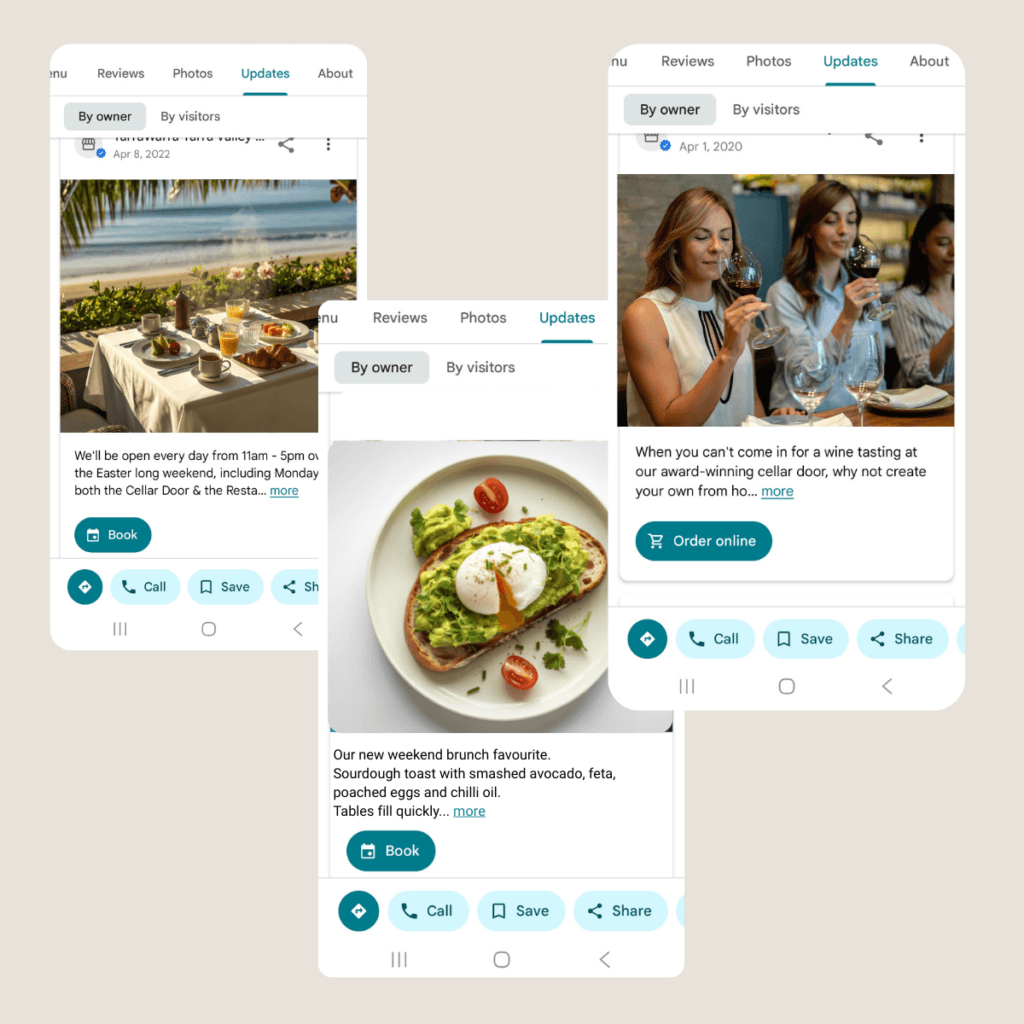
Updates examples for restaurants
7 Restaurant GBP Mistakes Killing Your Bookings
These are the issues I find most consistently when reviewing restaurant profiles across Melbourne and Victoria. None of them are obvious. All of them cost bookings.
| Mistake | Why it hurts | How to fix it |
|---|---|---|
| Primary category too broad (“Restaurant” instead of cuisine type) | You compete with everyone instead of appearing for your specific cuisine | Change primary to your specific cuisine category |
| Wrong or split hours | Guests arrive outside service hours or find you closed on a day you’re open | Set lunch and dinner service hours separately – update every time they change |
| Outdated food photos | Menu has changed but photos haven’t – creates disappointment and mistrust | Update photos every time your menu changes |
| No booking link connected | Extra steps between intent and booking = lost reservations | Connect your booking system directly to your GBP |
| Menu not current | Guests see dishes that no longer exist – awkward moment when they arrive | Link to your live website menu or update the built-in menu regularly |
| No review responses | Profile looks unmanaged – future guests lose confidence | Respond to every review within a week, positive and negative |
| Generic business description | Nothing specific, nothing memorable, no reason to choose you | Rewrite with cuisine, atmosphere, signature dishes and practical details |
If several of these apply to your restaurant, a one-time profile clean-up fixes all of them in one structured process – so your listing accurately reflects your restaurant and works for you every day after.
Restaurant Google Business Profile Optimisation Checklist
Use this to audit your current profile — and come back to it every season.
Profile foundations:
- Primary category is cuisine-specific – not just “Restaurant”
- Secondary categories added – takeaway, bar, event venue, brunch if applicable
- Business name is exact trading name – no keywords added
- Address matches your shopfront exactly
- Phone number is your reservations line
Information and hours
- Lunch and dinner service hours set separately if you run split services
- Public holiday hours updated – everyone, every year
- Website link goes to your bookings or menu page – not just the homepage
- Booking link connected directly in GBP
Content and visuals
- Business description written – 700+ characters, specific to your restaurant
- Minimum 15 photos uploaded
- Food photos are current – matching your active menu
- Interior photos show the restaurant at service time
- Menu linked or uploaded – current version
Ongoing activity
- All reviews responded to — positive and negative
- At least one post published in the last 30 days
- Profile reviewed for accuracy every season
- New food photos added when menu changes
Technical
- 100% profile completion
- Booking system connected
- Google Search Console verified
- FAQ schema applied if you have a FAQ section
Frequently Asked Questions
What is the best Google Business Profile category for a restaurant?
The best primary category is always your specific cuisine type – not the generic “Restaurant” category.
“Italian restaurant,” “Japanese restaurant,” “Vietnamese restaurant” – these match how guests actually search. A guest looking for Thai food searches “Thai restaurant near me” – not “restaurant near me.” Using your cuisine as the primary category puts you in front of the right guests at the right moment.
Add “Restaurant” as a secondary category if you want to appear in broader searches as well. But your primary should always be specific.
How do I get my restaurant to appear in the Google Maps map pack?
The map pack – the three restaurant listings that appear above regular search results – is determined by three signals: relevance, distance and prominence.
You can’t control distance. You can control relevance (through your categories, description and menu) and prominence (through how active and complete your profile is).
The fastest ways to improve prominence: complete every section of your profile, add recent photos, respond to all reviews and post regular updates. A profile that looks maintained and active ranks better than one that looks abandoned — even if the abandoned one has more reviews.
How often should a restaurant update its Google Business Profile?
Every time something changes – and at minimum once a month.
Hours change for public holidays. Menus change seasonally. Special events come and go. Each update to your profile signals to Google that your business is active and current. A profile last updated six months ago signals the opposite.
Review responses should happen within a week of each review appearing. Posts should go up at least once or twice a month. Photo updates should happen whenever your menu changes or you have something new worth showing.
Do restaurant reviews on Google actually affect bookings?
Significantly – and more directly than most restaurant owners realise.
A guest choosing between two similar restaurants will almost always choose the one with a higher rating and more recent reviews. But the owner response matters just as much as the rating itself. A restaurant with a 4.2 rating where the owner responds thoughtfully to every review often outperforms a 4.5 restaurant where reviews sit unanswered.
Review responses are visible to every future guest reading that review. They’re not just a courtesy to the reviewer – they’re a public signal of how your restaurant operates.
Should I respond to negative Google reviews?
Always – and the way you respond matters enormously.
A guest who had a poor experience and leaves a review is already unhappy. A defensive or dismissive response makes it worse – publicly. A calm, professional response that acknowledges their experience and offers to resolve it offline often turns a damaging review into a demonstration of good character.
Future guests reading a negative review aren’t just judging the original experience. They’re judging how the restaurant handled it. Handle it well and the review often becomes a net positive for your reputation.
Can I add my restaurant menu to Google Business Profile?
Yes – and you should.
You can link to your website menu page, upload a PDF or photo of your menu, or use Google’s built-in menu editor to list dishes individually with descriptions and prices.
The built-in menu editor gives Google the most structured information and may improve how your listing appears in food-specific searches. But any menu is better than no menu – guests want to know what you serve before they decide to visit or book.
Keep it current. A menu showing dishes you no longer serve creates confusion and occasionally frustration when a guest arrives expecting something specific.
What photos should a restaurant have on Google Business Profile?
Prioritise food photos first – they are the main decision driver for restaurant guests.
Start with your best-performing dishes, photographed in natural light and matching your current menu.
Then include interior photos that show the restaurant during service — not empty, and not staged with harsh lighting. Guests want to understand what it actually feels like to be there.
Add clear exterior photos so guests can recognise the entrance when they arrive.
Aim for a well-rounded set of at least 10–20 photos, covering food, interior, exterior and atmosphere. Update your food photos whenever your menu changes.
A profile with fresh, current images consistently performs better than one with older photos – even if the older images are technically higher quality.
Getting Your Restaurant’s Google Presence Right
Most restaurants put enormous care into the food, the service and the atmosphere. The Google listing -the first thing a guest sees before they ever walk through the door – often gets set up once and forgotten.
That gap is where bookings are lost.
Guests who would have loved your restaurant choose somewhere else because the profile didn’t give them enough confidence to book. Wrong hours. Old photos. A description that sounds like every other restaurant in the suburb. No response to the review left three months ago.
Getting your Google Business Profile optimised properly – knowing how to optimise Google Business Profile for a restaurant the right way – means your listing works for you every service. Before the guest decides where to eat. Before they pick up the phone. Before they walk through the door.
See what’s included in the one-time profile clean-up →
Or start with a free look at how your restaurant currently appears on Google Maps:
Request a free visibility check →
Not sure which service fits your situation? Visit the full services page →
Weronika Atkins is a Google Business Profile specialist working with hospitality venues across Melbourne and regional Victoria. Her focus is on how guests discover and choose venues on Google Maps — and what restaurant, café and winery owners can do to make that decision easier.
Why Your Restaurant Isn’t on Google Maps? And How to Fix It Fast
Hospitality Visibility
If your restaurant is not showing on Google Maps, you could be losing bookings without realising it. Learn the most common reasons hospitality venues disappear from search and the practical steps you can take to improve your Google Business Profile visibility.