Why Your Google Business Profile Might Be Showing a Customer’s Video – Not Yours
Open Google Maps. Search for a café, restaurant or winery near you.
What do you notice first?
Not the name. Not the hours. Not even the reviews.
It’s the image at the top of the listing. And increasingly – it’s a short video.
A clip of someone’s latte being poured. A dining room on a Friday night. A glass of wine being filled at a cellar door. Five seconds of atmosphere, and a guest has already formed an impression of whether they want to be there.
Here’s the part most hospitality venue owners don’t know: that video probably wasn’t uploaded by the business. It was uploaded by a customer. And the owner has no idea it’s the first thing people see when they search.
This is one of the most common – and most fixable – visibility problems I see on Google Business Profiles across Melbourne and regional Victoria.
What Is a Google Business Profile Video?
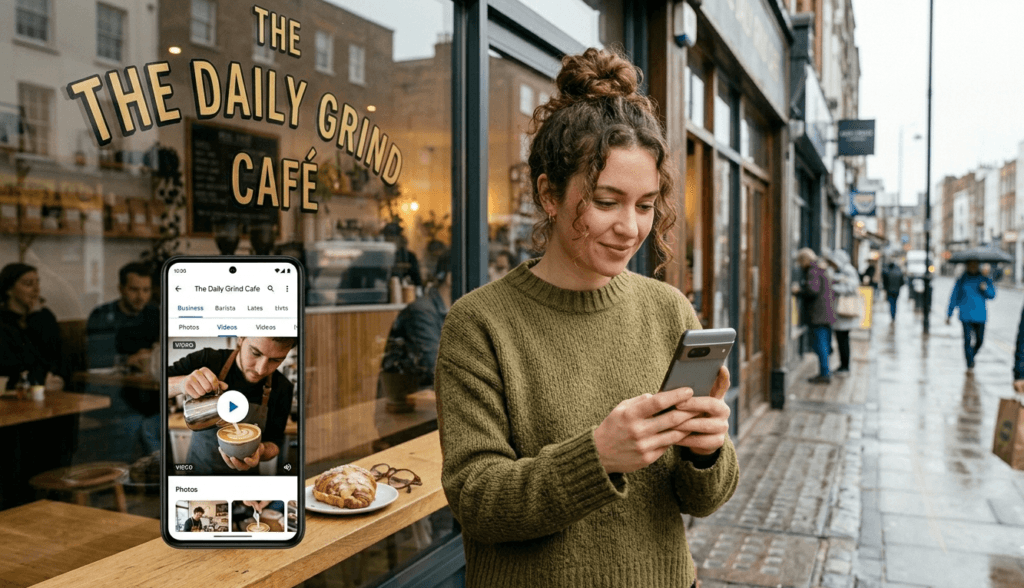
When a guest looks at a Google Business Profile – whether in Search or in Maps – there’s a photos section. Inside that section, videos appear alongside photos.
There are two types of videos that can appear on any hospitality venue profile:
| Owner uploads | Customer uploads |
| videos you add yourself through your Business Profile dashboard. | short clips anyone adds when they leave a review or contribute to Google Maps. |
Both appear in the same place. Google doesn’t label them differently for the guest browsing your listing. To someone deciding whether to visit your café, restaurant or winery, it all just looks like “this venue.”
One thing worth knowing:
If your profile has two or more videos – from any combination of owner and customer uploads – Google creates a separate Videos tab inside the photos section. If you only have one video, it sits quietly in the main gallery without its own tab. Two videos unlocks the tab. That small detail matters because the tab makes your visual content more discoverable.
If you haven’t thought about your Google Business Profile photos as a separate strategy from your general profile setup, that’s a good place to start alongside this.
The Cover Media Problem Every Hospitality Venue Owner Needs to Understand
Here’s something Google actually states in its own documentation, and most venue owners never read it:
If your chosen cover photo is low quality, or if other sources suggest a different image better represents your business, a user-submitted photo may be selected instead.
The same logic applies to video. Google’s algorithm makes the final call about what appears as the primary visual on your listing. And it doesn’t always choose what you chose.
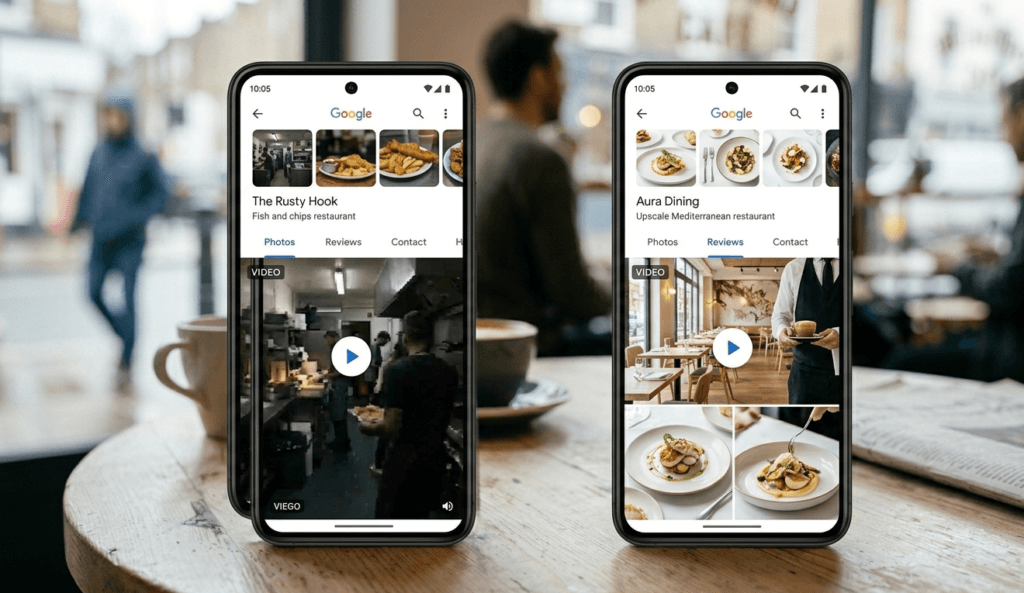
Which means: a guest films a shaky, dark ten-second clip of your restaurant entrance while leaving a review. A few weeks later, that clip is sitting at the top of your listing as the first thing every potential guest sees when they search for you.
This isn’t rare. It happens to cafés, restaurants and wineries that haven’t uploaded their own video content – and it happens quietly, without any notification.
The good news is that you can influence this. You can’t override Google’s algorithm, but you can give it something so much better to work with that it consistently chooses your content instead.
How Google Decides Which Video to Show
Google hasn’t published a precise formula, but based on how its algorithm handles visual content across Business Profiles, these are the signals that matter:
Quality
Higher resolution, well-lit content is consistently favoured. A dark or blurry clip — even one you uploaded yourself — carries less weight than a clear, bright one from a customer. Quality beats ownership every time.
Recency
Fresh content signals an active, currently operating business. A video uploaded this month carries more weight than one sitting there from two years ago.
Engagement
When guests click on a particular video or photo and spend time viewing it, Google takes note. Content that gets more interaction is more likely to be shown to the next person who searches for your venue.
Relevance to the search
Google tries to match the visual to what the searcher is actually looking for. Someone searching for “winery with cellar door” may be shown footage of your tasting room rather than your car park.
Owner vs customer content
Owner-uploaded content does carry some weight in the algorithm — but it doesn’t automatically override a higher-quality customer upload. A low-quality owner video will not beat a bright, clear customer clip.
The honest summary: the venue with the best content wins, not the one with the most technical control.
Why Video Works Differently to Photos on a Hospitality Venue Profile
Photos are static. A guest looks, registers the image, moves on.
Video is different. Even a fifteen-second clip of your restaurant during a busy dinner service – people at tables, warm light, movement – communicates something a photo never can. It shows the feeling of being there.
This matters because when a guest is choosing between your café and two others in the same suburb, or your winery and three others in the same region, they’re not comparing menus line by line. They’re asking themselves: does this feel like somewhere I want to be?
A short video answers that question faster and more convincingly than anything else on your profile.
It also reduces hesitation.
A guest who has watched twenty seconds of your space already feels slightly familiar with it. They can picture themselves sitting there, ordering that drink, being in that room. That mental step – imagining themselves as a guest – is one of the key moments in the decision to actually visit.
I’ve written about this in detail in how guests decide where to eat on Google Maps.
What Happens to a Hospitality Venue Profile With No Owner Videos
Your profile doesn’t just look incomplete – it actively works against you.
If customers have uploaded videos that are low quality, badly lit, filmed at an awkward angle, or simply not representative of your venue at its best, those are what guests see. A clip that makes your café look smaller than it is. A winery tasting room filmed in bad light on a quiet Tuesday. A restaurant moment that doesn’t reflect the experience you’ve spent years building.
The guest browsing Google Maps has no idea about any of this context. They see what’s on the screen, make a decision in about five seconds, and scroll to the next option.
Your own videos close that gap. A well-shot clip of your venue on a good night gives Google something genuinely better to work with – and gives guests a first impression that actually reflects what you offer.
If you’re not sure what guests currently see when they find your profile, a free visibility check gives you a clear picture of where you stand.
Google Business Profile Video: Technical Requirements
Before you film anything, here are the actual specs from Google:
| Spec | Requirement |
|---|---|
| Maximum length | 30 seconds |
| Minimum resolution | 720p (1080p recommended) |
| Maximum file size | 75 MB |
| Accepted formats | MP4 or MOV |
Your phone handles all of this. Any smartphone made in the last three or four years shoots at 1080p by default.
Three things worth knowing before you upload:
Google reviews every video before it goes live. This typically takes 24 to 48 hours. Don’t film something at Friday dinner service and expect it to appear before the Saturday rush.
If your video doesn’t appear after 48 hours, it’s likely been rejected – usually because of a technical issue (wrong format, file too large, too long) or a content issue. You won’t receive an explanation. Check the specs and try again.
Don’t use stock footage. Don’t upload fully AI-generated video.
Google’s guidelines are clear that videos must reflect your actual business at your actual location. Content that looks generic or staged may be rejected, or worse – approved but unconvincing to guests who are trying to get a genuine feel for your space before they visit.
One practical note on aspect ratio: videos on Google Maps are often displayed cropped as a square (1:1 ratio). Filming with the most important content centred – the dish, the room, the view – means it won’t be lost when Google crops it for display.
How to Give Your Own Videos the Best Chance of Being Chosen as Cover Media
This is the part that matters most for any café, restaurant or winery owner reading this.
If you want your video – not a customer’s clip – to be what Google displays, here’s how to tilt the algorithm in your favour.
Practical Guide
| What to Do | Why It Matters | What It Looks Like in Practice |
|---|---|---|
| Upload multiple videos | A single video is not enough. A small library gives Google more options and signals an actively managed profile. | Start with 3–5 videos showing different aspects of your venue. |
| Keep videos bright and well-lit | Lighting is one of the strongest ranking signals for visual content. Dark videos are rarely selected. | Film near windows, during daytime, or in well-lit service. Natural light always performs best. |
| Use most of the 30 seconds | Longer videos give Google more context and increase engagement potential. | Aim for 20–30 seconds instead of very short clips. |
| Film your best moments | Google favours content that reflects the real experience at its peak. | Busy brunch, full dining room, active cellar door, food arriving at tables. |
| Show a variety of content | Different videos match different search intent. This increases visibility. | Film atmosphere, food, drinks, and different areas of your space. |
| Keep it natural and real | Over-produced content feels less trustworthy and often performs worse. | Simple phone footage, steady, unedited, authentic moments. |
| Update when things change | Fresh content signals that your venue is active and current. | Upload after menu changes, renovations, seasonal updates or events. |
You’re not trying to “beat the algorithm” – you’re giving Google better content to choose from.
What Videos Work Best for Cafés, Restaurants and Wineries
You don’t need a production team. You need 20 to 30 seconds and something worth filming.
Atmosphere clips
People at tables, the room at capacity, the energy of a service. This answers the question guests are really asking: what does it feel like in here? For a restaurant, this might be dinner service on a good night. For a café, it might be a busy weekend morning with natural light streaming in. For a winery, it might be guests at the cellar door on a Sunday afternoon.
Food and drink close-ups
A pour, a plate, a coffee being made, a wine being poured at the cellar door. Steady hands, good light, close enough to see the detail. Twenty seconds of a beautiful dish or a perfectly pulled espresso does more than a paragraph of description.
Real, natural moments
Something unscripted – staff preparing for service, morning light in an empty dining room before opening, grapes being harvested, a tasting in progress. Real moments, not performed ones. These are often the clips that generate the most engagement because they feel genuine.
What to avoid: Empty rooms filmed in a rush. Harsh overhead lighting that makes the space look cold. Anything blurry or shaky. A bad video uploaded by you is no better than a bad video uploaded by a customer – and you have more control over yours.
How Videos Influence the Guest Decision (The Psychology Behind It)
When a guest is choosing between your venue and two or three others in the same area, they’re not reading every review. They’re scanning. They’re looking for a feeling that matches what they’re after.
Video shortcuts that process.
Instead of asking a guest to imagine your café, restaurant or winery from static photos, a short clip shows them. The atmosphere, the pace, the light, the kind of experience they’re walking into. It answers questions they didn’t know they were asking.
There’s also something more specific that happens when we watch a video of a place: we mentally rehearse being there. We picture sitting at that table, ordering that wine, having that experience with the people we’re going with. That mental rehearsal makes the decision to visit feel less like a risk and more like a natural next step.
This is why the data makes sense. Hospitality listings with strong, up-to-date visual content — photos and videos – consistently translate into more bookings and more foot traffic than listings with static or outdated imagery. The guest who has already watched your space is the guest who arrives feeling like they know where they’re going.
Understanding how this fits into the broader decision guests make when they find you on Google Maps is something I explore in detail in how guests decide where to eat on Google Maps.
A Simple Four-Video Starter Plan for Any Hospitality Venue
You don’t need to do this all at once. Build the library first, then maintain it.
Video 1 — Atmosphere.
Film your venue during a good service.
The room, people at tables, the energy of the space.
For a winery, this might be guests at the cellar door.
For a café, your busiest morning hour.
For a restaurant, a full Friday dinner service. Twenty to thirty seconds.
Video 2 — Food or drink
Film one dish being plated,
one coffee being made,
one wine being poured.
Steady, close, well-lit. Let the detail do the work.
Video 3 — A real moment
Something unscripted.
Morning prep.
Staff getting ready.
A harvest moment at the vineyard.
Light coming through the window before opening.
Something that shows your venue is a living, real place.
Video 4 — Your best angle
The view from a window table.
The bar from across the room.
The cellar door looking out over the vines.
Film your space at its most compelling.
After these four, add something new when you have something worth showing – a seasonal menu change, a renovation, a new space. Quality and variety matter more than frequency.
How Videos Connect to Your Whole Google Profile
Videos don’t work in isolation. They sit alongside your photos, your reviews, your business description, and how active your profile has been recently. Google sees it all together.
A hospitality venue profile with strong videos, consistent Google reviews, accurate information, and regular updates sends a very different signal than one that hasn’t been touched in a year.
If you’re working through the key areas of your Google Business Profile for the first time – not just photos and videos but the full picture – the Fix Your GBP in 30 Minutes guide covers the essentials in a practical, step-by-step format built specifically for hospitality venues.
👉 You can explore the Resources page for practical guides designed to help hospitality venues improve visibility, build trust, and influence guest decisions on Google Maps.
For café, restaurant and winery owners in regional Victoria specifically, visibility on Google Maps carries even more weight than in metro areas — tourists and visitors rely on it almost exclusively when deciding where to go. The regional Victoria Google Business Profile guide covers what makes visibility different in regional areas.
Frequently Asked Questions
Can customers upload videos to my Google Business Profile without my permission?
Yes. Anyone with a Google account can add photos and videos to a business listing as part of their Maps contribution. You can flag customer-uploaded content that violates Google’s policies – videos that are irrelevant, deceptive, or offensive – but you cannot remove content simply because you don’t like it or it doesn’t represent your venue well. The most effective response is to make your own uploads consistently better than anything a customer is likely to add.
Does Google tell me when a customer uploads a video to my profile?
Not automatically. You can monitor your profile through your Business Profile dashboard and check the photos section regularly. This is one of the reasons active profile management matters – leaving your profile unchecked means you may not know what guests are seeing until someone tells you. For hospitality venues, checking your photos and videos monthly is a reasonable minimum.
Will uploading videos improve my Google Maps ranking?
Videos are not a direct ranking signal in the way that reviews or your primary business category are. But they contribute to engagement – and engagement does influence how Google ranks your profile. A café, restaurant or winery profile that gets more views, more photo clicks, and more time spent on it is one Google treats as more relevant and popular. Videos that stop guests from scrolling are doing SEO work, even if the mechanism is indirect.
How long does it take for my video to appear on my profile after uploading?
Google reviews uploaded videos before they go live. This process typically takes 24 to 48 hours. If your video hasn’t appeared after 48 hours, it has likely been rejected – usually for a technical reason (wrong format, file too large, too long) or a content reason. You won’t receive an explanation. Check the specs above and try uploading again.
Can I choose which video appears as the main visual on my profile?
You can set a cover photo through your dashboard, but you cannot set a cover video. The primary visual Google displays – whether a photo or video – is determined by its algorithm based on quality, recency, and engagement signals. Uploading high-quality videos alongside a strong cover photo gives Google the best options to choose from, but the final decision is Google’s.
A customer’s video is showing as the main image on my profile. What can I do?
You can’t force Google to replace it directly, but you can make your own content the more compelling option. Upload several high-quality, well-lit videos that genuinely represent your venue at its best. Over time, as your content accumulates engagement, Google’s algorithm tends to shift toward it. If the customer-uploaded content violates Google’s policies, you can flag it for review – but removal isn’t guaranteed. Consistent, quality owner uploads are your most reliable long-term tool.
Do I need a professional videographer for my restaurant’s videos on Google Business Profile?
No. Google’s guidance is that videos should feel real and authentic, not polished productions. A modern smartphone, good natural light, and a steady hand are all you need. For a café, restaurant or winery, authenticity actually works in your favour – guests searching Google Maps want a genuine sense of your space, not a commercial. In fact, videos that look too produced can feel unconvincing.
How often should I add new videos on my Goggle Business Profile?
Videos sit in your profile as a permanent gallery – they’re not time-sensitive posts that disappear. Focus on building a library of three to five quality videos first, then add new content when something genuinely changes at your venue: a new season, a renovation, a new space, a significant menu change. Quality and variety matter more than posting on a regular schedule.
Want to know exactly what guests currently see when they find your café, restaurant or winery on Google Maps – including your photos, videos, and overall profile? The free visibility check takes five minutes and shows you clearly where your profile stands.
READ NEXT:
5 Signs Your Google Business Profile Is Losing You Customers (And What to Fix)
How tourists choose restaurants on Google Maps in regional Victoria