5 Signs Your Google Business Profile Is Losing You Customers (And What to Fix)
There’s a problem that’s harder to spot than not showing up on Google at all.
Your venue appears in the results. Someone finds you. They land on your profile.
And then they leave. They choose somewhere else.
That decision takes about ten seconds. And in most cases, the venue owner never knows it happened.
I review Google Business Profiles losing customers for cafés, restaurants, and wineries across Melbourne and regional Victoria – and this is the issue I see most often. Not profiles that are invisible. Profiles that are visible but quietly losing customers every single day because something on them isn’t reading right.
The frustrating part is that most of these problems are fixable. But you can’t fix what you can’t see.
Here are five signs your Google Business Profile is costing you customers – and what to do about each one.
Why this matters more than ever
Before getting into the five signs, it helps to understand what’s changed.
Google Business Profiles have become the main decision point for customers choosing where to eat, drink, or visit.
Most people don’t go to your website.
They open Google Maps.
They scan two or three options.
And they decide – often in seconds.
Recent data shows that around 86% of profile views come from searches like:
• “café near me”
• “restaurant open now”
That means most people finding your profile have never heard of you before. Your Google Business Profile is doing all the work of a first impression. And that first impression now includes more than it used to:
• photos
• reviews
• opening hours
• description
• attributes
• recent activity
Google now prioritises profiles that look active, complete, and trusted – not just technically correct.
A profile that feels current will outperform one that looks like nobody’s touched it in months.
From a customer’s perspective, this is simple.
If something feels unclear – old photos, missing reviews, incorrect hours – they don’t investigate. They move on.
And that decision happens faster than most venue owners realise.
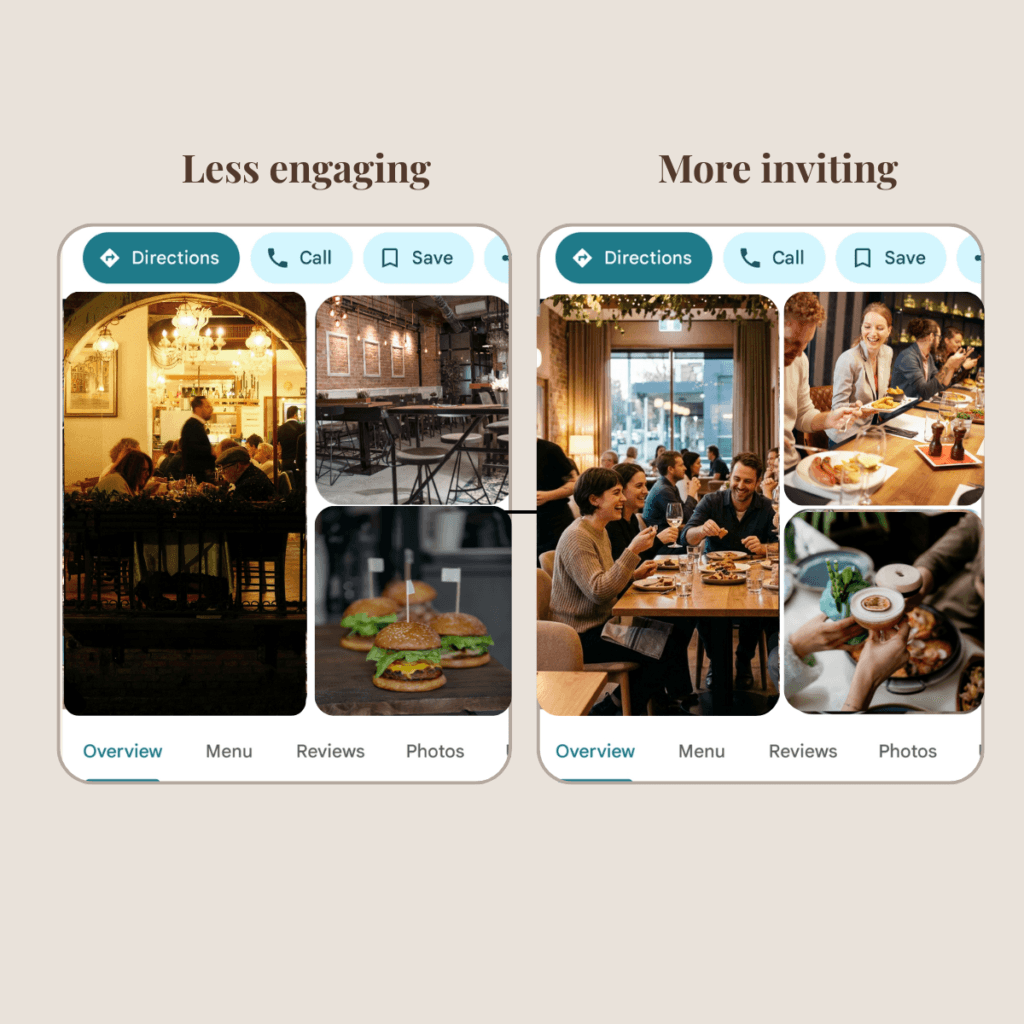
Sign 1: Your photos don’t reflect what your venue actually looks like today
This is the most common issue I find when I review a profile – and the one that costs the most customers silently.
What this often looks like:
• photos from 2–3 years ago
• menu has changed, but photos haven’t
• only a few images — no food shown
• dark or unflattering lighting
• no sense of atmosphere
Here’s what’s happening from a customer’s perspective:
photos are the first emotional signal. Before they read your description, before they check your rating, they’ve already formed a feeling about your venue based on what they can see. Old, dim, or irrelevant photos create doubt. And doubt sends people to the next listing.
Why this matters:
• +42% more direction requests with photos
• +35% more website clicks
• profiles with 15+ photos perform significantly better
• up to +38% higher engagement with high-quality images
A real scenario I see regularly: A café in inner Melbourne has a beautiful space and excellent coffee – but the only photos on their profile are from when they opened five years ago. The colour scheme has changed, the menu is different, and the current seasonal specials aren’t represented anywhere. A customer searching for brunch in the area sees those old photos, can’t tell if the venue is still the same, and picks somewhere with more current content. The café owner doesn’t know this is happening.
What to fix:
✔️ upload fresh photos of your space as it looks now
✔️include food, drinks, interior, exterior, atmosphere
✔️ aim for at least 10 images
✔️ use bright, natural lighting (phone is enough)
✔️ add new photos every few weeks
Google treats fresh content as a signal that the profile is actively managed.
If you’re not sure what types of photos work best on a Google Business Profile, I’ve covered this in detail here: What Photos Work Best on Google Business Profile for Cafés, Restaurants and Wineries
Sign 2: Your reviews have gone quiet — and you’re not responding to the ones you have
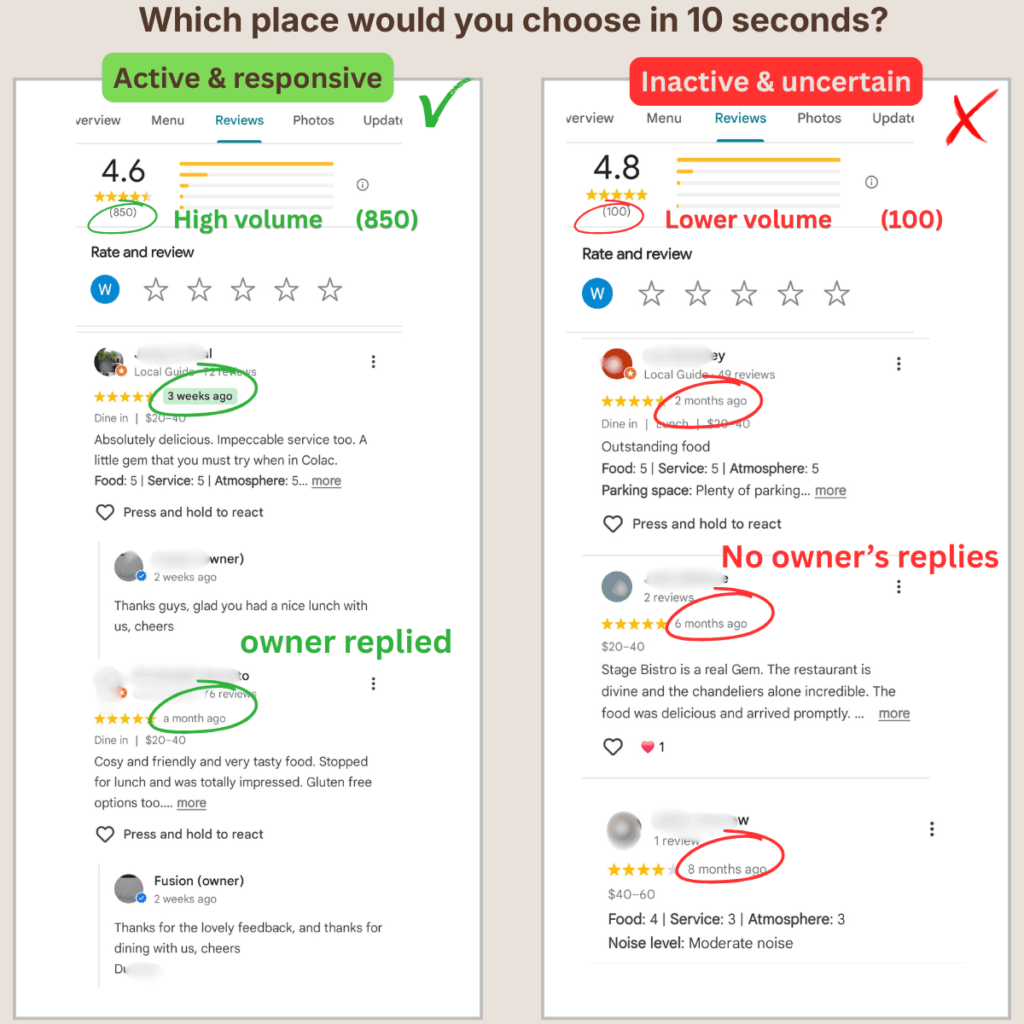
This one is easy to miss because it happens gradually. You used to get a steady stream of reviews. Lately, it’s slowed down. The last review came in six weeks ago, maybe longer. And there are a handful sitting there that you haven’t replied to yet.
From a customer’s perspective, this reads as uncertainty.
Is this place still active? Has something changed? A profile with the most recent review from several months ago looks different to one where someone left a review last week and the owner replied two days later. One feels current and cared for. The other feels like it might have changed — or closed.
What this looks like:
• last review from 1–2 months ago
• no recent activity
• several reviews without replies
• no clear interaction from the owner
This matters for ranking as well as conversion. Google’s recent algorithm explicitly evaluates popularity and engagement – how often people interact with your profile, read your reviews, and visit your listing.
Review recency and owner responses are both signals Google uses to assess whether a profile is actively managed.
The numbers behind it:
• 50% of customers trust reviews like personal recommendations
• 92% choose businesses with at least a 4★ rating
• Google reviews now influence decisions more than external platforms
What to fix:
• build a simple, consistent way to ask for reviews
• use low-pressure prompts (QR code, staff mention, follow-up)
• aim for steady flow — not spikes
• reply to every review (good and difficult)
Even a short reply matters.
It shows customers – and Google – that someone is present and paying attention.
For a full system on building consistent review flow:
⭐ How to Get More Google Reviews for Your Restaurant
⭐ Google Review QR Code for Restaurants: Simple Setup That Works
Sign 3: Your hours are wrong, outdated, or missing public holiday information
This is the issue I find on almost every profile I review — and it’s one of the most damaging because the customer doesn’t find out until it’s too late.
What this looks like:
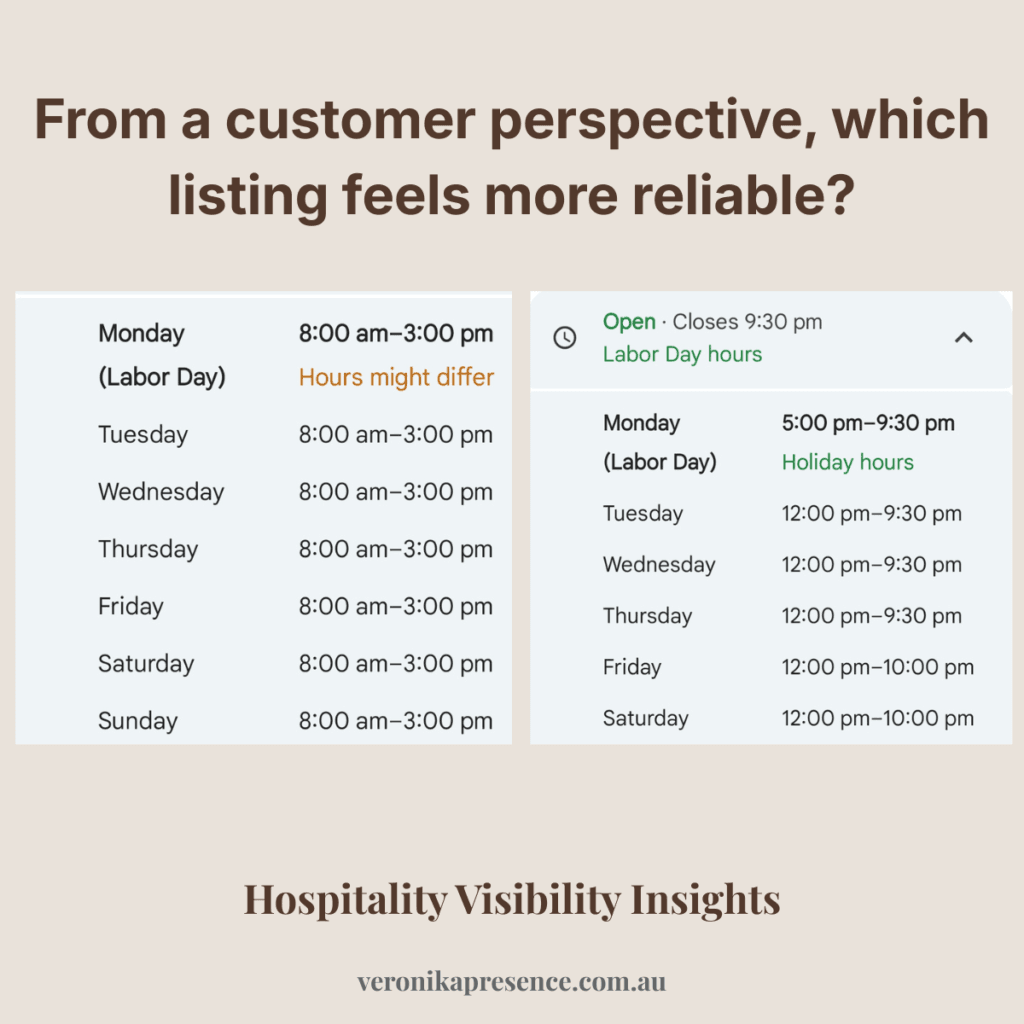
• public holiday hours not set
• recent trading changes not updated
• early closures not reflected
• seasonal hours still showing months later
Your standard hours might be accurate. But Easter is coming up and your profile still shows normal Monday hours. Or you changed your trading days three months ago and updated the signage but forgot to update Google. Or you close early on Sundays but the profile says you close at 5pm. Or a public holiday is approaching and there’s no special hours set at all.
The customer sees “Open” on their phone, drives to your venue, and finds the door locked. That experience doesn’t just lose them for that visit. It loses them for good – and they often leave a review about it.
Why this matters:
• incorrect hours break trust instantly
• customers don’t double-check — they move on
• Google relies on accuracy as a trust signal
Profiles with accurate, up-to-date information consistently perform better than those with gaps or inconsistencies.
Wrong or missing festive hours are one of the most common problems across hospitality businesses in Australia, including well-established venues that have everything else in order. It’s not a sign of a neglected profile — it’s just easy to overlook, especially during busy periods when you’re focused on running the venue rather than managing the listing.
And the knock-on effect is real. Profiles with accurate, up-to-date information receive significantly more views and direction requests than those with outdated or incomplete details. Inaccurate hours don’t just frustrate customers — they reduce Google’s confidence in the listing, which affects visibility.
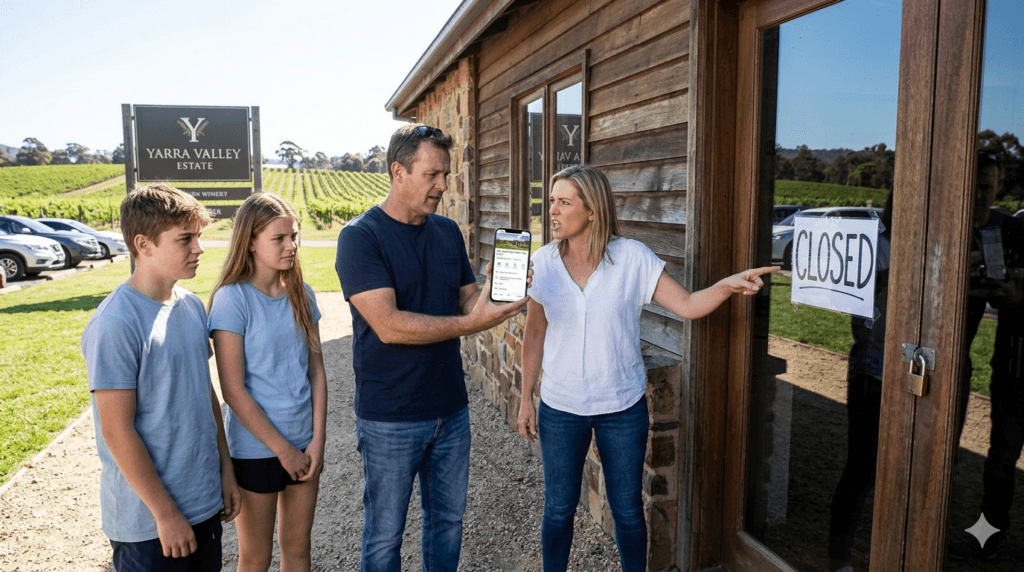
A real scenario: A winery in the King Valley runs special hours over the harvest season, then forgets to revert them. For six weeks after harvest ends, the profile shows incorrect hours. Customers planning weekend visits assume the cellar door is closed on Fridays and choose a winery that clearly shows it’s open. The owner finds out months later when someone mentions it in a review.
What to fix:
• check hours before every public holiday
• use special/holiday hours (don’t overwrite standard hours)
• update immediately after any change
• preview your profile in incognito to see what customers see
It takes five minutes – and it’s one of the highest-impact things you can do.
If your hours aren’t reliable, nothing else on your profile matters.
Sign 4: Your description doesn’t give customers a reason to choose you
Most descriptions fall into one of two categories:
Blank – or generic.
What this looks like:
| Type | What it looks like | Why it doesn’t work |
|---|---|---|
| Blank | There’s nothing there. No context. No explanation. Nothing for Google — or customers — to work with. | No information = no clarity. Customers can’t understand what your venue is about. Google has less to work with. |
| Generic | “We serve great coffee in a warm and welcoming environment.” “Family-friendly restaurant with fresh, seasonal ingredients.” | Sounds nice – but says nothing specific. Every café or restaurant could say the same. No reason to choose you. |
The description is one of the few places on your profile where you can actually say something specific – something that helps a customer decide that your venue is the right one for them. And most profiles are leaving that space empty.
Why this matters:
• complete profiles get significantly more clicks
• customers trust businesses with full, clear information
• most people finding you don’t know you yet
Your description is often the first real introduction to your venue.
What a useful description does
It answers three simple questions:
• What kind of place is this – specifically?
• What makes it worth visiting?
• Is it right for me right now?
What to include
• your specialty (what you’re known for)
• your setting or atmosphere
• who it’s ideal for
• practical details (bookings, walk-ins, dog-friendly)
Specific details help customers decide faster – and that’s what helps customers choose.
Keep it under 750 characters. Write it in plain language. No keyword lists, no URLs, no marketing-speak. Write it like you’re describing your venue to someone who’s never been but is genuinely curious.
| BEFORE “Welcome to The River Table. We offer a warm and inviting dining experience with fresh, locally sourced ingredients and a menu that changes with the seasons. Our team is passionate about food and hospitality, and we look forward to welcoming you.” | BETTER “Relaxed riverside restaurant in the Yarra Valley, known for wood-fired dishes and a weekly changing menu built around local producers. Good for long lunches, small celebrations, and groups who like to share. Bookings recommended on weekends.” |
For more on writing a description that actually works: How to Write a Google Business Profile Description That Gets More Customers
Sign 5: Someone has changed your profile and you haven’t noticed
This one surprises most venue owners when I raise it – but it happens more than you’d think.
Google allows anyone to suggest edits to your business listing.
Your category, your hours, your address, your phone number – all of it can be flagged for a change by a third party. And in some cases, Google’s systems apply those changes automatically, without requiring your approval first.
It can also happen through Google’s own automated processes. If Google detects inconsistencies between your profile and information it finds elsewhere – your website, a directory listing, a booking platform – it may adjust your profile details to resolve what it sees as a conflict. Sometimes those adjustments are correct. Sometimes they’re not.
The result is that your profile can look fine from the outside while quietly showing wrong information. A category that no longer fits. A phone number that’s been changed. Hours that don’t match what you’ve set. An address formatted differently to the one on your website.
This matters because inconsistency is one of the factors Google’s automated systems flag when deciding whether to trust a listing. A profile that looks uncertain gets shown less. And customers who find incorrect information – especially phone numbers or hours – lose confidence immediately.
A real scenario: A restaurant in Melbourne’s inner north rebranded last year. The owner updated the profile name, website, and photos. But an old category from the previous owner’s era was still sitting as a secondary category – one that no longer reflected the venue’s current offering. Google was sending the profile to searches that weren’t relevant, and suppressing it for searches that were. The owner had no idea until a profile review flagged it.
What to fix:
• log into your profile at least once a month
• check name, categories, address, phone, website
• make sure everything matches exactly
• turn on notifications for suggested changes
• correct anything immediately
It’s also worth searching your venue name on Google in an incognito browser regularly – not logged in as the owner – so you see exactly what a customer sees. This is different to what shows in your dashboard, and the difference is sometimes significant.
Ongoing care matters more than most owners realise
These changes don’t always happen at once. They happen quietly – over time.
That’s why many venues choose to have someone regularly checking their profile, making small updates, and keeping everything consistent in the background.
It’s not about fixing one issue – it’s about making sure nothing slips over time.
(This is part of the ongoing profile care I offer →)
The quick check most venue owners never do
Open an incognito browser. Search your venue name on Google. Look at what comes up.
Not what you see when you’re logged into your account. What a first-time customer sees when they find you for the first time.
Does the cover photo represent your venue as it looks right now? Are the hours correct for today? Is there a review from the last few weeks? Does the description say anything specific about your venue? Does the profile feel active and current – or does it feel like something from a few years ago?
This takes about two minutes. Most venue owners haven’t done it in months, if ever – because they’re running a business, not monitoring a Google listing. But it’s the single fastest way to see what’s actually working against you.
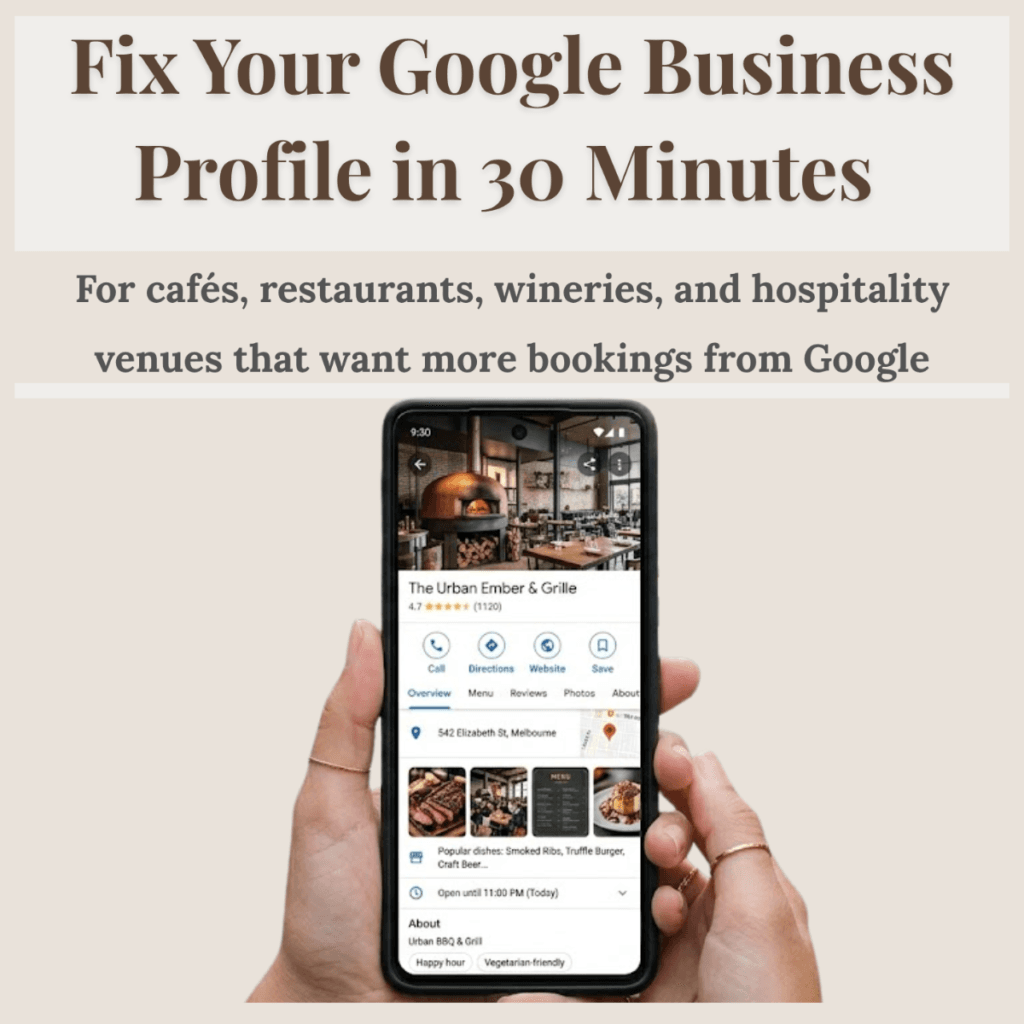
Fix Your Google Business Profile in 30 Minutes
Instant PDF download. No technical knowledge needed. Works for cafés, restaurants, and wineries across Australia.
$19 AUD One-time purchase
Instant download
Secure checkout via Gumroad · PDF delivered immediately
A note on what’s changed recently
It’s worth understanding that Google has changed how Business Profiles work over the past couple of years.
And those changes directly affect how hospitality venues are discovered – and chosen.
What’s changed:
• the Q&A feature has been removed
• the chat function is no longer available
• AI-generated summaries now pull information directly from your profile
This means your profile is no longer just a listing. It’s a source of information for Google itself.
If your details are unclear, incomplete, or outdated – that affects how your venue appears in search, and whether it’s included in AI-driven results at all.
Ranking has shifted too:
Google now places more weight on:
• activity
• engagement
• consistency
Not just whether your profile is technically correct.
A profile that looks active and well-maintained will often outperform one that was set up properly — but hasn’t been touched in months.
What this means in practice:
A profile that worked well two years ago, may not be performing the same way today. The baseline has changed.
Key insight:
It’s no longer enough to “set and forget” your profile. It needs to stay active, accurate, and current.
What to do if you’re not sure what’s affecting your profile
Not every issue is obvious from the outside. Some profiles look complete on the surface but are missing the signals that customers and Google both respond to.
- The photos might all be there, but they’re the wrong type.
- The reviews might be coming in, but the response pattern is working against the profile.
- The hours might be correct, but a category issue is sending the profile to the wrong searches.
This is what a visibility check looks at – not just the obvious fields, but how the profile reads as a whole, from a customer’s perspective, compared to what’s actually ranking in your area.
If you run a café, restaurant, or winery across Melbourne or regional Victoria and you’re not sure how your profile is actually performing, I offer a free visibility check. I’ll look at your profile, compare it against local competitors, and give you a clear, honest picture of what’s working and what isn’t.
No jargon. No sales pitch. Just a straightforward look at where things stand.
Request your free visibility check →
FAQ
Can a Google Business Profile lose customers even if it’s showing up on Google Maps?
Yes – and this is more common than most venue owners realise. Appearing in search results and converting those views into visits are two separate things. A profile can be fully visible but still losing customers because the photos are outdated, the description is generic, reviews have slowed, or something has been changed without the owner’s knowledge. Visibility gets you in front of customers. Your profile content is what makes them choose you.
How often should I be updating my Google Business Profile?
At minimum, check it once a month and update hours before every public holiday. Beyond that, add new photos every two to four weeks, respond to reviews within a few days of them coming in, and post an occasional update when something changes at the venue – new menu items, seasonal hours, upcoming events. Consistency matters more than frequency. A profile that gets small, regular attention performs significantly better than one that gets a big update once a year.
Can someone change my Google Business Profile without my permission?
Yes. Google allows user-suggested edits to any listing, and some can be applied automatically. Google’s own systems can also adjust profile details if they detect inconsistencies with other information online. It’s worth logging in regularly to check your details – business name, categories, hours, phone number, website – haven’t been changed. Turning on email notifications in your profile settings means Google will contact you when changes are suggested, giving you a chance to review them before they’re applied.
Why have my Google reviews slowed down even though the venue is busy?
Review flow rarely happens by itself – customers need a prompt. Most happy customers are willing to leave a review but simply don’t think to do it unless someone asks. The solution isn’t a one-off push but a consistent, low-pressure habit. A QR code at the table, a brief mention from staff, a follow-up to regulars – any of these, done consistently, will produce a steady flow over time. A spike followed by silence actually looks worse on a profile than a slow, steady pace.
Do my Google Business Profile photos really affect whether customers choose my venue?
Significantly. Photos are the first thing most customers notice on a profile – before the rating, before the description. Businesses with photos receive 42% more direction requests than those without. Profiles with 15 or more current photos see stronger engagement across every metric. The impact is especially high for food and hospitality, where customers are making a decision based partly on what the venue looks and feels like. Old, dark, or irrelevant photos create doubt. Current, clear photos build confidence.
What does a complete Google Business Profile actually include?
Business name, address, phone number, website link, opening hours (including public holiday hours), primary and secondary categories, business description, attributes (things like outdoor seating, dietary options, parking, accessibility), photos (exterior, interior, food, drinks — at least 10), and a menu link where relevant. Beyond the basics, it also includes consistent recent reviews, owner responses, and regular posts or updates. A profile that has all of this in place and is being actively maintained is one that converts – not just one that appears.
My Google Business Profile looks fine to me. How do I know if something’s wrong?
The issue is that what you see when you’re logged into your account is different to what a customer sees when they find you for the first time. Open an incognito browser, search your venue name on Google, and look at your profile as a customer would. Check the cover photo, the hours, the most recent review, and whether anything looks outdated or uncertain. This is the fastest way to spot issues that aren’t visible from inside your dashboard.
Weronika Atkins is the founder of Veronika Presence, supporting cafés, restaurants, and wineries across Melbourne and Victoria with Google Business Profile management and visibility.
Read next: